cancel
Showing results for 
Search instead for 
Did you mean: 

Vote for your favorite vizzies from the Power BI Dataviz World Championship submissions. Vote now!

Reply
Anonymous
Not applicable

Multiple Legends via Selection - Line Chart

I am using a line chart and am trying to use multiple columns as legends, so that users can switch between the way in which the data is split up, for example: via product type, or via vendor, or via binned cost. Is there a workaround to be able to do this?

1 ACCEPTED SOLUTION
Anonymous
Not applicable

Hi @Anonymous 

It can be done with the help of Perspective.

You need to have the August 2020 release and have Tabular Editor installed through Help --> External Tools

Here is the link to the steps.

https://powerbi.microsoft.com/en-us/blog/power-bi-desktop-august-2020-feature-summary/#_Perspectives

View solution in original post

5 REPLIES 5
Anonymous
Not applicable

Hi @Anonymous 

It can be done with the help of Perspective.

You need to have the August 2020 release and have Tabular Editor installed through Help --> External Tools

Here is the link to the steps.

https://powerbi.microsoft.com/en-us/blog/power-bi-desktop-august-2020-feature-summary/#_Perspectives

harshnathani
Community Champion
Community Champion

HI @Anonymous ,


Can you share some sample data and the expected output.


Also, see if this helps.


https://www.youtube.com/watch?v=_sxLEGRCo28&t=182s


Regards,
Harsh Nathani
Did I answer your question? Mark my post as a solution! Appreciate with a Kudos!! (Click the Thumbs Up Button)

Anonymous
Not applicable

@harshnathani


I think I solved it. I used the dynamic x-axis solution, and applied it to the legend, see below:


https://www.youtube.com/watch?v=lFd2hjkKz_Q

Anonymous
Not applicable

Hi @Anonymous ,

It's glad to hear that your problem has been resolved. Thanks for sharing your solution here. Could you please mark your last reply as Answered? It will help others in the community find the solution easily if they face the same problem with you. Thank you.

Best Regards

Rena 

Anonymous
Not applicable

Harsh,


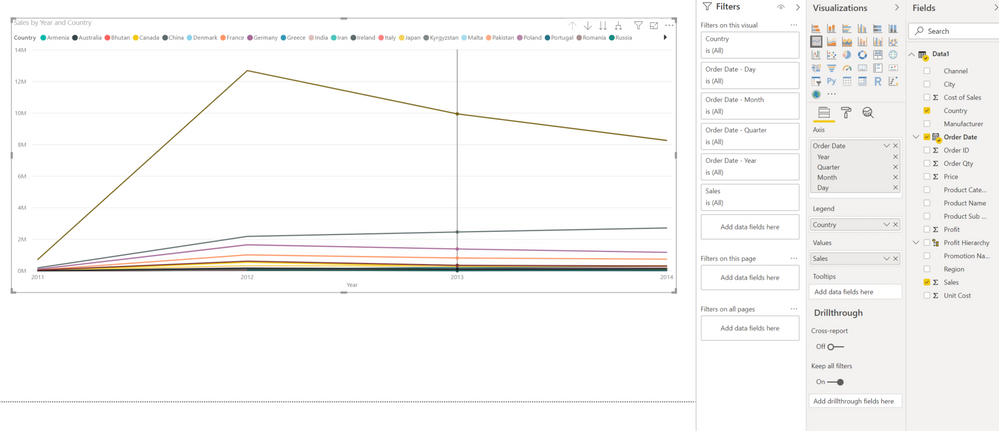
This is not the dataset I am using, but it paints the picture I am going for. You can see that I placed "Country" on the Legend. Now if I wanted to split sales up by "Product Category" or "Region", as a desktop user, I can do that. But my end users, without pro-accounts cannot. Is there a workaround, so that the end user can select a drop down to change the Legend. So they can split sales up via "Country", or "Region", or "Manufacturer", etc.


chilesam_0-1599764562356.png


Helpful resources

Announcements
Power BI DataViz World Championships

Power BI Dataviz World Championships

Vote for your favorite vizzies from the Power BI World Championship submissions!

Sticker Challenge 2026 Carousel

Join our Community Sticker Challenge 2026

If you love stickers, then you will definitely want to check out our Community Sticker Challenge!

January Power BI Update Carousel

Power BI Monthly Update - January 2026

Check out the January 2026 Power BI update to learn about new features.

FabCon Atlanta 2026 carousel

FabCon Atlanta 2026

Join us at FabCon Atlanta, March 16-20, for the ultimate Fabric, Power BI, AI and SQL community-led event. Save $200 with code FABCOMM.