Don't miss your chance to take the Fabric Data Engineer (DP-600) exam for FREE! Find out how by attending the DP-600 session on April 23rd (pacific time), live or on-demand.
Learn moreNext up in the FabCon + SQLCon recap series: The roadmap for Microsoft SQL and Maximizing Developer experiences in Fabric. All sessions are available on-demand after the live show. Register now
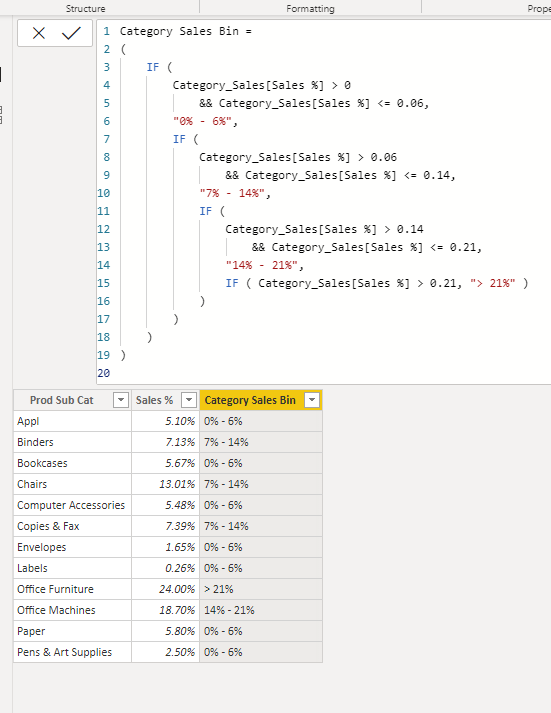
I have created a calculated column:
hi @Anonymous - you can try with the below formula
Proud to be a Super User!
While the code based approach using complex nested IF statements will work, I usually prefer a DATA based approach:
1) Create a small table (maybe use ENTER DATA) that contains the following: Sort Order (INT), Low Range, High Range, Description.
2) Add data as needed: 1 , 0, 0.06, "0% - 6.00%", etc.
3) Set the Sort By of Descripiton to the Sort Order column.
4) Hide the table. It needs no relationships.
5) Add a column with a formual like this:
Category Sales Bin = CALCULATE ( VALUES ( 'Lookup Table'[Description]),
FILTER ( 'Lookup Table',
'Lookup Table'[Low Range] <= 'Main Table'[Sales%]
&&
'Lookup Table'[High Range] >= 'Main Table'[Sales%]
)
)
Now you have a solution that is DATA driven. Put that table in an EXTERNAL source like a CSV, Excel, or database table and you can change the bins by changing the DATA, not having to touch the CODE.
Proud to be a Super User! | |
Ah, because you need it to be a MEASURE, not a COLUMN.
From what I see, every sale in Product Sub Category of Appliances has a Category Sales Bin of "0% - 6.00%" so your table is doing a GROUP BY of that text value.
Proud to be a Super User! | |
Because in the first line: 6.00 is just that. Six. It is NOT six PERCENT. You need 0.06.
Proud to be a Super User! | |
If you have recently started exploring Fabric, we'd love to hear how it's going. Your feedback can help with product improvements.
A new Power BI DataViz World Championship is coming this June! Don't miss out on submitting your entry.
| User | Count |
|---|---|
| 46 | |
| 43 | |
| 39 | |
| 19 | |
| 15 |
| User | Count |
|---|---|
| 68 | |
| 68 | |
| 31 | |
| 27 | |
| 24 |