cancel
Showing results for 
Search instead for 
Did you mean: 

Next up in the FabCon + SQLCon recap series: The roadmap for Microsoft SQL and Maximizing Developer experiences in Fabric. All sessions are available on-demand after the live show. Register now

Reply
Anonymous
Not applicable

Multiple IFs

I have created a calculated column:

Category Sales Bin = (IF(Orders[Sale%]>0 && Orders[Sale%]<=6.00, "0% - 6%",
IF(Orders[Sale%]>6.00 && Orders[Sale%]<=14.00,"7% - 14%",
IF(Orders[Sale%]>14.00 && Orders[Sale%]<=21.00,"14% - 21%",
IF(Orders[Sale%]>21.00,"> 21%" )))))
 
sale% is also a calcualted column which is calculating percentage and is in decimal format.
Now Category Sales Bin is showing "0% - 6%" for all the values
For 13.01 or 12.68 it is showing "0% - 6%".
 
Why it is showing for all same value
 
Image:Link 
5 REPLIES 5
Sumanth_23
Memorable Member
Memorable Member

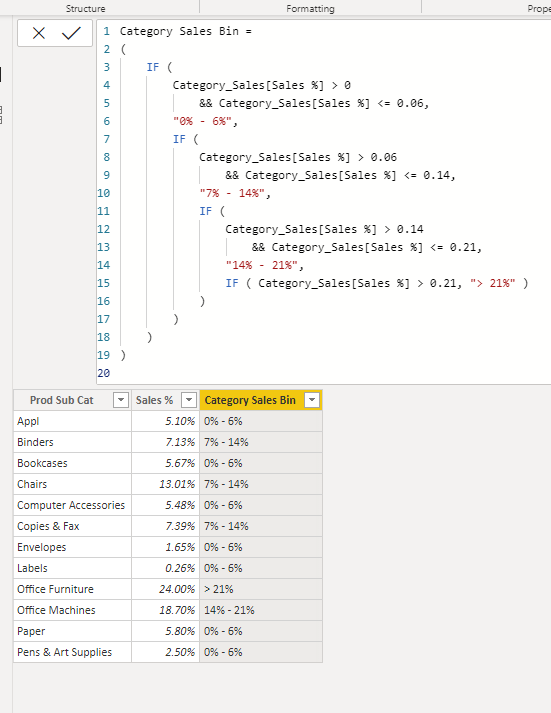
hi @Anonymous - you can try with the below formula

Category Sales Bin =
(
IF (
Category_Sales[Sales %] > 0
&& Category_Sales[Sales %] <= 0.06,
"0% - 6%",
IF (
Category_Sales[Sales %] > 0.06
&& Category_Sales[Sales %] <= 0.14,
"7% - 14%",
IF (
Category_Sales[Sales %] > 0.14
&& Category_Sales[Sales %] <= 0.21,
"14% - 21%",
IF ( Category_Sales[Sales %] > 0.21, "> 21%" )
)
)
)
)
 
Multiple IFs.png
 
Please mark the above comment as a solution to help others find it more quickly. Also please provide a 👍 if my comment helped with solving your issue. Thanks!
Did I answer your question? Mark my post as a solution! Appreciate your Kudos!

Proud to be a Super User!


While the code based approach using complex nested IF statements will work, I usually prefer a DATA based approach:

1) Create a small table (maybe use ENTER DATA) that contains the following: Sort Order (INT), Low Range, High Range, Description.

2) Add data as needed: 1 , 0, 0.06, "0% - 6.00%", etc.

3) Set the Sort By of Descripiton to the Sort Order column.

4) Hide the table. It needs no relationships.

5) Add a column with a formual like this:


Category Sales Bin = CALCULATE ( VALUES ( 'Lookup Table'[Description]),

                                 FILTER ( 'Lookup Table',

                                       'Lookup Table'[Low Range] <= 'Main Table'[Sales%]

                                  &&

                                       'Lookup Table'[High Range] >= 'Main Table'[Sales%]

                                            )

                                     )


Now you have a solution that is DATA driven. Put that table in an EXTERNAL source like a CSV, Excel, or database table and you can change the bins by changing the DATA, not having to touch the CODE.


Did I answer your question? If so, mark my post as a solution. Also consider helping someone else in the forums!

Proud to be a Super User!


Anonymous
Not applicable

@Sumanth_23  @ToddChitt ,


I have made the changes but it is still showing same.


Attching the Power bi file.


File:Link 

Ah, because you need it to be a MEASURE, not a COLUMN. 

From what I see, every sale in Product Sub Category of Appliances has a Category Sales Bin of "0% - 6.00%" so your table is doing a GROUP BY of that text value.


Did I answer your question? If so, mark my post as a solution. Also consider helping someone else in the forums!

Proud to be a Super User!


ToddChitt
Super User
Super User

Because in the first line: 6.00 is just that. Six. It is NOT six PERCENT. You need 0.06.


Did I answer your question? If so, mark my post as a solution. Also consider helping someone else in the forums!

Proud to be a Super User!


Helpful resources

Announcements
New to Fabric survey Carousel

New to Fabric Survey

If you have recently started exploring Fabric, we'd love to hear how it's going. Your feedback can help with product improvements.

Power BI DataViz World Championships carousel

Power BI DataViz World Championships - June 2026

A new Power BI DataViz World Championship is coming this June! Don't miss out on submitting your entry.

Join our Fabric User Panel

Join our Fabric User Panel

Share feedback directly with Fabric product managers, participate in targeted research studies and influence the Fabric roadmap.

March Power BI Update Carousel

Power BI Community Update - March 2026

Check out the March 2026 Power BI update to learn about new features.