cancel
Showing results for 
Search instead for 
Did you mean: 

Learn from the best! Meet the four finalists headed to the FINALS of the Power BI Dataviz World Championships! Register now

Reply
Anonymous
Not applicable

Multiple Columns together with Multiple Values

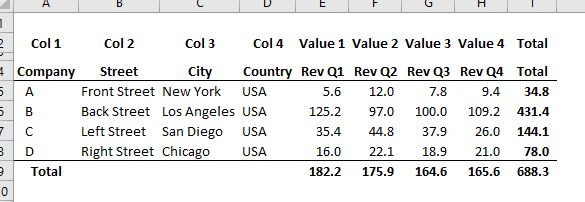
Hi, I am having troubles showing multiple Columns together with mulitple Values. This is a very easy thing to do using pivote tables, but I couldn't figure out how to do this in Power BI with neither a Table nor a Matrix. For example, the closest thing to what I want to create, would be the Matrix, but it only allows me to show 1 column with the 4 values, instead of 4 columns with 4 values. See below the ideal version. How do I show Multiple Columns together with Mulitple Values?

Mtpl Columns + Mtpl Values.png

1 ACCEPTED SOLUTION
Anonymous
Not applicable

@Anonymous , @Washivale - Thanks for your help - I think I figured it out. It seems to have been the the Data / Drill function that didn't let show the data. It now works .

Chris


View solution in original post

5 REPLIES 5
Washivale
Resolver V
Resolver V

Hi Chris,


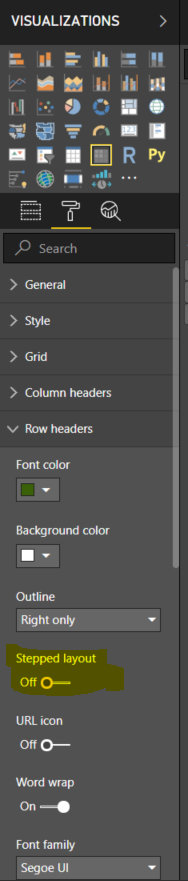
Use matrix visual and ensure stepped layout is off in Formatting - Row Headers.


sorry if i misunderstood your requirement.


Capture.PNG

Anonymous
Not applicable

@Washivale  - Thanks for your reply. I tried what you suggested but it didn't have any effect.

Thanks

Chris


Anonymous
Not applicable

@Anonymous , @Washivale - Thanks for your help - I think I figured it out. It seems to have been the the Data / Drill function that didn't let show the data. It now works .

Chris


Anonymous
Not applicable

@Anonymous - A Table visual should work fine - could you share a screenshot of what's happening, or share your pbix?

Thanks,

Nathan

Anonymous
Not applicable


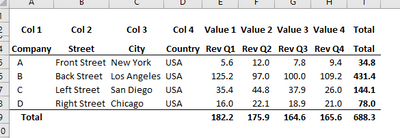
Thanks for your reply. Below are both, the CURRENT version and the IDEAL version. No matter how many columns I add, it will only show the first one.


CURRENT:

Mtpl Columns + Mtpl Values_CURRENT.png


IDEAL:


Mtpl Columns + Mtpl Values_IDEAL.png


I can see in visualizations that the additional columns are there, but they won't show.


Thanks

Chris

Helpful resources

Announcements
Join our Fabric User Panel

Join our Fabric User Panel

Share feedback directly with Fabric product managers, participate in targeted research studies and influence the Fabric roadmap.

February Power BI Update Carousel

Power BI Monthly Update - February 2026

Check out the February 2026 Power BI update to learn about new features.

FabCon Atlanta 2026 carousel

FabCon Atlanta 2026

Join us at FabCon Atlanta, March 16-20, for the ultimate Fabric, Power BI, AI and SQL community-led event. Save $200 with code FABCOMM.