Join us at FabCon Atlanta from March 16 - 20, 2026, for the ultimate Fabric, Power BI, AI and SQL community-led event. Save $200 with code FABCOMM.
Register now!Learn from the best! Meet the four finalists headed to the FINALS of the Power BI Dataviz World Championships! Register now
I have 2 tables.
The first table will be filtered by date using a slicer. This will return a list of invoice numbers.
I then would like to filter the second table by those invoice numbers that were returned in the first table.
Thank You
Solved! Go to Solution.
Hi @bgerew,
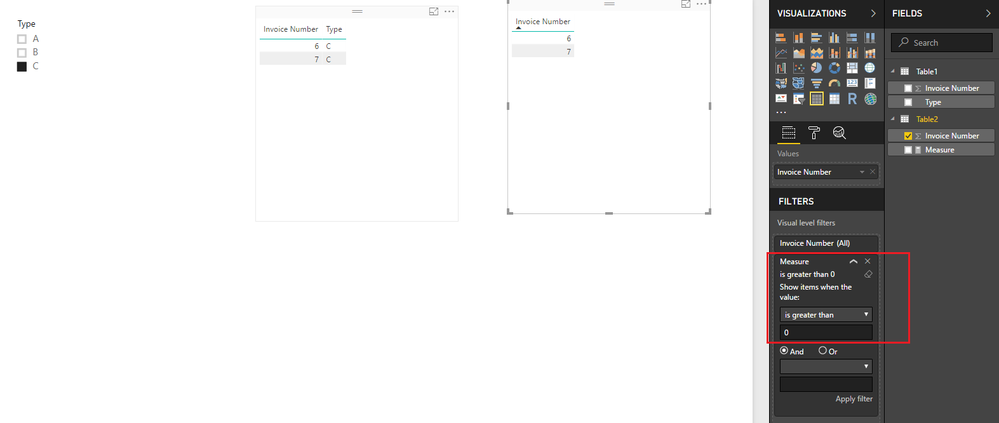
Based on my test, you should be able to use the formula below to create a measure, then use the measure to apply a visual level filter(Measure is great than 0) to filter the second table by selected value in first table.
Measure =
SUMX (
Table1,
IF (
CONTAINS (
Table1,
Table1[Invoice Number], FIRSTNONBLANK ( Table2[Invoice Number], 1 )
),
1,
0
)
)
Here is the sample pbix file for your reference. ![]()
Regards
Hi @bgerew,
Based on my test, you should be able to use the formula below to create a measure, then use the measure to apply a visual level filter(Measure is great than 0) to filter the second table by selected value in first table.
Measure =
SUMX (
Table1,
IF (
CONTAINS (
Table1,
Table1[Invoice Number], FIRSTNONBLANK ( Table2[Invoice Number], 1 )
),
1,
0
)
)
Here is the sample pbix file for your reference. ![]()
Regards
I'm a touch confused - is it possible that your data set has an invoice number more than once that can have different dates inside and outside of your slicer? I'd have thought that they should be unique, and the first slicer should, assuming there's some sort of relevant relationship, that the second table would be filtered in the way you want by default?
the invoice number can not be a managed relationship as it is a many to many relationship.
Share feedback directly with Fabric product managers, participate in targeted research studies and influence the Fabric roadmap.
Check out the February 2026 Power BI update to learn about new features.
| User | Count |
|---|---|
| 61 | |
| 59 | |
| 42 | |
| 18 | |
| 15 |
| User | Count |
|---|---|
| 109 | |
| 101 | |
| 39 | |
| 29 | |
| 29 |