This is best Fabric, Power BI, SQL and AI community event. How do we know? The last event sold out! Save €200 with code FABCMTY200.
Register nowA new Data Days event is coming soon! This time we’re going bigger than ever. Fabric, Power BI, SQL, AI and more. Don't miss out.
I have 2 tables.
The first table will be filtered by date using a slicer. This will return a list of invoice numbers.
I then would like to filter the second table by those invoice numbers that were returned in the first table.
Thank You
Solved! Go to Solution.
Hi @bgerew,
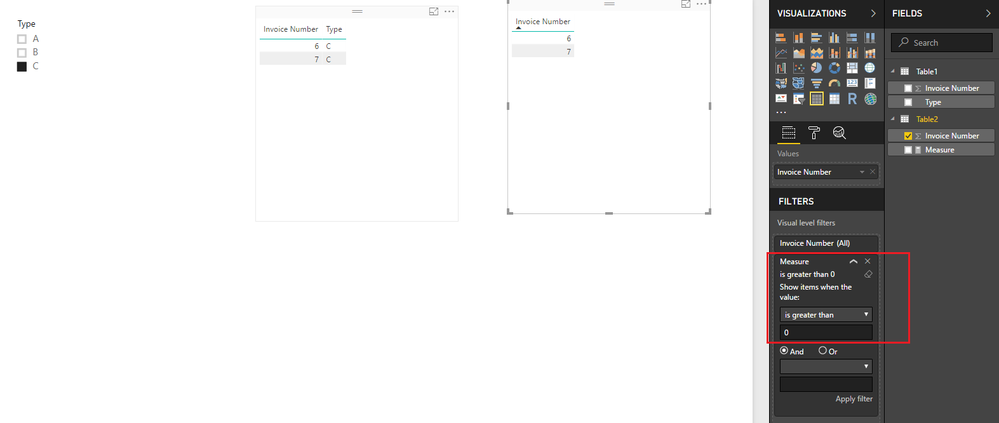
Based on my test, you should be able to use the formula below to create a measure, then use the measure to apply a visual level filter(Measure is great than 0) to filter the second table by selected value in first table.
Measure =
SUMX (
Table1,
IF (
CONTAINS (
Table1,
Table1[Invoice Number], FIRSTNONBLANK ( Table2[Invoice Number], 1 )
),
1,
0
)
)
Here is the sample pbix file for your reference. ![]()
Regards
Hi @bgerew,
Based on my test, you should be able to use the formula below to create a measure, then use the measure to apply a visual level filter(Measure is great than 0) to filter the second table by selected value in first table.
Measure =
SUMX (
Table1,
IF (
CONTAINS (
Table1,
Table1[Invoice Number], FIRSTNONBLANK ( Table2[Invoice Number], 1 )
),
1,
0
)
)
Here is the sample pbix file for your reference. ![]()
Regards
I'm a touch confused - is it possible that your data set has an invoice number more than once that can have different dates inside and outside of your slicer? I'd have thought that they should be unique, and the first slicer should, assuming there's some sort of relevant relationship, that the second table would be filtered in the way you want by default?
the invoice number can not be a managed relationship as it is a many to many relationship.
Check out the May 2026 Power BI update to learn about new features.
Sign up to receive a private message when registration opens and key events begin.
If you have recently started exploring Fabric, we'd love to hear how it's going. Your feedback can help with product improvements.
| User | Count |
|---|---|
| 31 | |
| 26 | |
| 25 | |
| 22 | |
| 13 |
| User | Count |
|---|---|
| 58 | |
| 50 | |
| 26 | |
| 20 | |
| 19 |