cancel
Showing results for 
Search instead for 
Did you mean: 

Data Days is here! Join us now for 60+ days of learning, challenges, and connection. Learn more

Reply
bgerew
New Member

Multi step filter

I have 2 tables.


The first table will be filtered by date using a slicer. This will return a list of invoice numbers.


I then would like to filter the second table by those invoice numbers that were returned in the first table.


Thank You

1 ACCEPTED SOLUTION
v-ljerr-msft
Microsoft Employee
Microsoft Employee

Hi @bgerew,


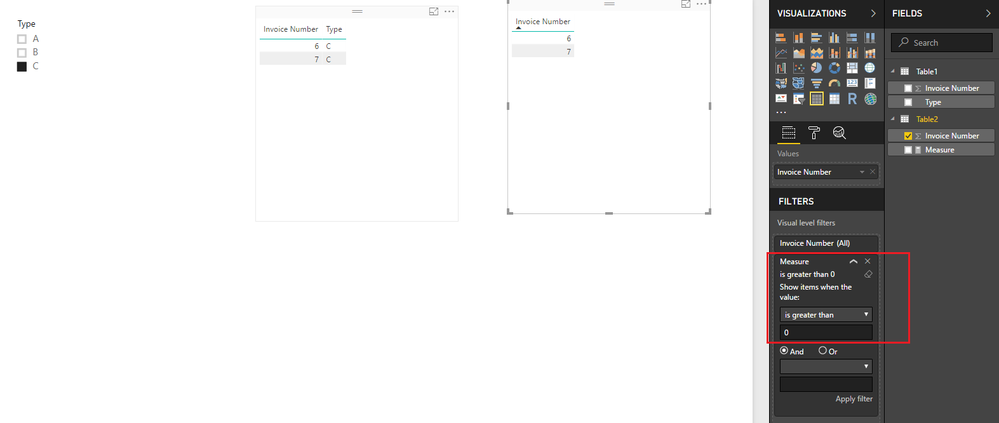
Based on my test, you should be able to use the formula below to create a measure, then use the measure to apply a visual level filter(Measure is great than 0) to filter the second table by selected value in first table.

Measure =
SUMX (
    Table1,
    IF (
        CONTAINS (
            Table1,
            Table1[Invoice Number], FIRSTNONBLANK ( Table2[Invoice Number], 1 )
        ),
        1,
        0
    )
)

r4.PNG


Here is the sample pbix file for your reference. Smiley Happy


Regards

View solution in original post

3 REPLIES 3
v-ljerr-msft
Microsoft Employee
Microsoft Employee

Hi @bgerew,


Based on my test, you should be able to use the formula below to create a measure, then use the measure to apply a visual level filter(Measure is great than 0) to filter the second table by selected value in first table.

Measure =
SUMX (
    Table1,
    IF (
        CONTAINS (
            Table1,
            Table1[Invoice Number], FIRSTNONBLANK ( Table2[Invoice Number], 1 )
        ),
        1,
        0
    )
)

r4.PNG


Here is the sample pbix file for your reference. Smiley Happy


Regards

jthomson
Solution Sage
Solution Sage

I'm a touch confused - is it possible that your data set has an invoice number more than once that can have different dates inside and outside of your slicer? I'd have thought that they should be unique, and the first slicer should, assuming there's some sort of relevant relationship, that the second table would be filtered in the way you want by default?

the invoice number can not be a managed relationship as it is a many to many relationship.

Helpful resources

Announcements
Fabric Data Days is here Carousel

Fabric Data Days 2026

Don't miss out on Data Days, June 15 through August 7. Learn Fabric, Power BI, SQL, AI and more.

May Power BI Update Carousel

Power BI Monthly Update - May 2026

Check out the May 2026 Power BI update to learn about new features.

Power BI DataViz World Championships carousel

Power BI DataViz World Championships - June 2026

A new Power BI DataViz World Championship is coming this June! Don't miss out on submitting your entry.