cancel
Showing results for 
Search instead for 
Did you mean: 

The Power BI Data Visualization World Championships is back! Get ahead of the game and start preparing now! Learn more

Reply
giulia_iem
Advocate II
Advocate II

Multi-row card visualization

Hi,


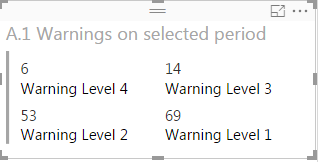
I have a Multi-row card that looks like this:

mrc.png


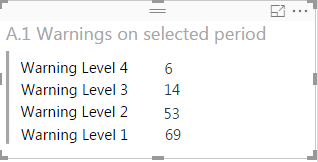
 would like to change card visualization setting all the keys on the left and all the values on the right, something like this:


mrc2.png


I thougth it should be easy, but I really can't find a way to do so


Can you help me please?


Thank you

5 REPLIES 5
Daydaaa
Frequent Visitor

I was working on the same problem and found a solution. Transpose the table in Transform data then use multi row card.

Greg_Deckler
Community Champion
Community Champion

Seems to me that you want a table visualization.


Follow on LinkedIn
@ me in replies or I'll lose your thread!!!
Instead of a Kudo, please vote for this idea
Become an expert!: Enterprise DNA
External Tools: MSHGQM
YouTube Channel!: Microsoft Hates Greg
Latest book!:
DAX For Humans

DAX is easy, CALCULATE makes DAX hard...

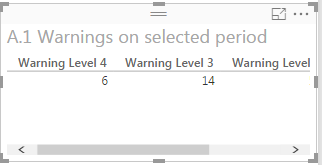
A simple table visualization would have keys as column header instead as first row:


mrc3.png

That is not what I want.


There is a way to switch rows with columns with tables?


Unfortunately in my report I don't have enough space to use a Multirow card with all the values on a single column.

I was thinking that your data was 2 columns, Warning Level and Value. Could you pivot your data on import in order to get it in that format? If so, you could use a table visualization and hide the header row.


Follow on LinkedIn
@ me in replies or I'll lose your thread!!!
Instead of a Kudo, please vote for this idea
Become an expert!: Enterprise DNA
External Tools: MSHGQM
YouTube Channel!: Microsoft Hates Greg
Latest book!:
DAX For Humans

DAX is easy, CALCULATE makes DAX hard...

If those 4 Warning Levels are Measures the only way to organize them Vertically is with the Multi-Row Card.


Unfortunately they would not look like you want - you have to make the Multi-Row Card a bit narrower so they all form a single column.


Look at my answer here 

http://community.powerbi.com/t5/Desktop/Matrix-and-Tables-multiple-measures-layout-question/m-p/2897...

Helpful resources

Announcements
Power BI DataViz World Championships

Power BI Dataviz World Championships

The Power BI Data Visualization World Championships is back! Get ahead of the game and start preparing now!

November Power BI Update Carousel

Power BI Monthly Update - November 2025

Check out the November 2025 Power BI update to learn about new features.

FabCon Atlanta 2026 carousel

FabCon Atlanta 2026

Join us at FabCon Atlanta, March 16-20, for the ultimate Fabric, Power BI, AI and SQL community-led event. Save $200 with code FABCOMM.