This time we’re going bigger than ever. Fabric, Power BI, SQL, AI and more. We're covering it all. You won't want to miss it.
Learn moreDid you hear? There's a new SQL AI Developer certification (DP-800). Start preparing now and be one of the first to get certified. Register now
Hi,
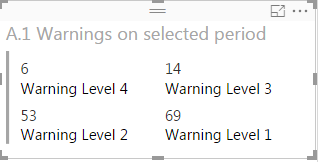
I have a Multi-row card that looks like this:
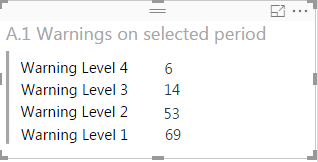
would like to change card visualization setting all the keys on the left and all the values on the right, something like this:
I thougth it should be easy, but I really can't find a way to do so
Can you help me please?
Thank you
I was working on the same problem and found a solution. Transpose the table in Transform data then use multi row card.
Seems to me that you want a table visualization.
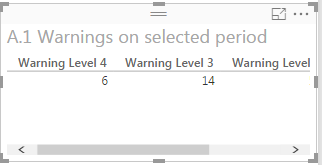
A simple table visualization would have keys as column header instead as first row:
That is not what I want.
There is a way to switch rows with columns with tables?
Unfortunately in my report I don't have enough space to use a Multirow card with all the values on a single column.
I was thinking that your data was 2 columns, Warning Level and Value. Could you pivot your data on import in order to get it in that format? If so, you could use a table visualization and hide the header row.
If those 4 Warning Levels are Measures the only way to organize them Vertically is with the Multi-Row Card.
Unfortunately they would not look like you want - you have to make the Multi-Row Card a bit narrower so they all form a single column.
Look at my answer here
Check out the April 2026 Power BI update to learn about new features.
Sign up to receive a private message when registration opens and key events begin.
If you have recently started exploring Fabric, we'd love to hear how it's going. Your feedback can help with product improvements.
| User | Count |
|---|---|
| 34 | |
| 31 | |
| 25 | |
| 20 | |
| 16 |
| User | Count |
|---|---|
| 61 | |
| 49 | |
| 28 | |
| 23 | |
| 23 |