Join us at FabCon Atlanta from March 16 - 20, 2026, for the ultimate Fabric, Power BI, AI and SQL community-led event. Save $200 with code FABCOMM.
Register now!The Power BI Data Visualization World Championships is back! Get ahead of the game and start preparing now! Learn more
Hello,
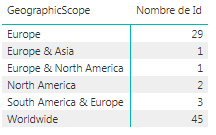
I am currently trying to represent informations on a map based on the following table on power bi desktop:
Is there any way to display this on a map ? I can't find a way to display either worldwide counter or multi-continents counters...
Thank you !
Regards,
Antoine
Solved! Go to Solution.
@Anonymous
You may select Split Column By Delimiter > Advanced options > Split into Rows in Query Editor.
@Anonymous
You may select Split Column By Delimiter > Advanced options > Split into Rows in Query Editor.
The Power BI Data Visualization World Championships is back! Get ahead of the game and start preparing now!
| User | Count |
|---|---|
| 38 | |
| 37 | |
| 33 | |
| 32 | |
| 29 |
| User | Count |
|---|---|
| 129 | |
| 88 | |
| 79 | |
| 68 | |
| 63 |