cancel
Showing results for 
Search instead for 
Did you mean: 

The Power BI Data Visualization World Championships is back! Get ahead of the game and start preparing now! Learn more

Reply
Jonathan_P
Helper II
Helper II

Multi fact problem

Hello,


I am relatively new to star schema design, Power BI and its best pratices, especially when there are multiple fact tables on the same report.


I am struggling a little bit with the following design where there are 2 fact tables, 'Ventes' (the business process are the sales) and 'Analyses' (business process are the chemical or water analysis performed). I want to be able to slice 'Ventes' using 'Date de facture' (Date dimension). At the same time on the report, I want to see the 'Date d'analyse' related to 'Analyses'. I want that info on the same table visualization.


I tried to put cross filter direction to Both for relationships between 'Ventes' and the 4 dimensions at the center but I have a warning (that indicates that Power BI can't handle more than one filtering path) that prevent me to do so.


1) Do I need to put a common Date dimension?

2) Do I need to create a compound dimension for all shared dimension between the 2 fact tables?

Etc.


Note that the 'Date d'analyse' is a date a few days before the 'Date de facture'. Logically, I can't have a common Date dimension.


I know there is something wrong with my design.


Thank you


Schéma.png

1 ACCEPTED SOLUTION
v-sihou-msft
Microsoft Employee
Microsoft Employee

@Jonathan_P


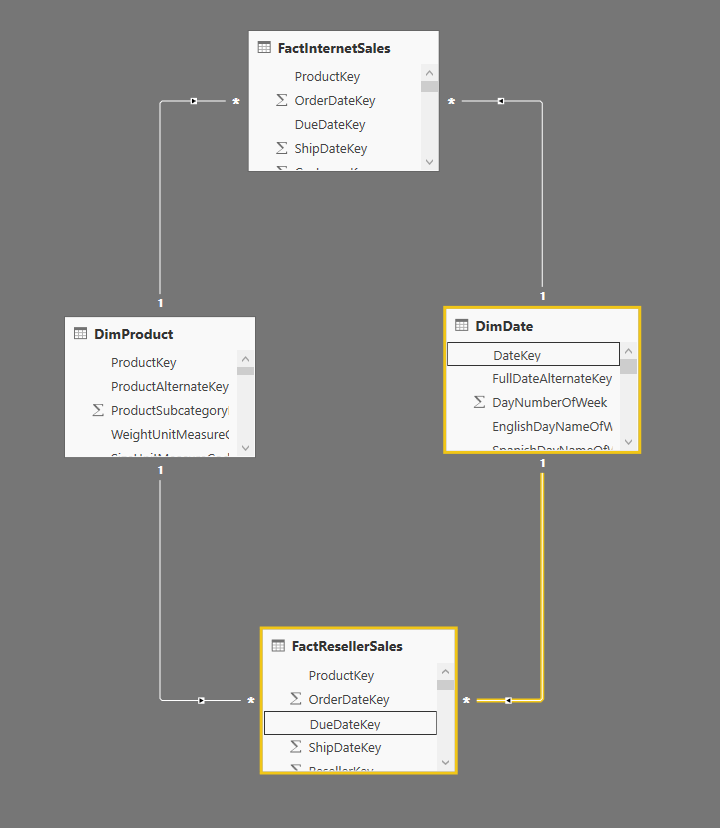
In this scenario, what do you mean " 'Date d'analyse' is a date a few days before the 'Date de facture'." If this just a date to filter corresponding fact table, which means there's no direct relationship between 'Ventes' and 'Analyses', you should build date dimension into a common dimension.


" Power BI can't handle more than one filtering path"


You are correct. You can only keep one path between two tables based on relationship. So it's better to make "Single" cross filter direction between those common dimensions and fact tables.


5.PNG


Regards,

View solution in original post

3 REPLIES 3
v-sihou-msft
Microsoft Employee
Microsoft Employee

@Jonathan_P


In this scenario, what do you mean " 'Date d'analyse' is a date a few days before the 'Date de facture'." If this just a date to filter corresponding fact table, which means there's no direct relationship between 'Ventes' and 'Analyses', you should build date dimension into a common dimension.


" Power BI can't handle more than one filtering path"


You are correct. You can only keep one path between two tables based on relationship. So it's better to make "Single" cross filter direction between those common dimensions and fact tables.


5.PNG


Regards,

Thanks to both of you, @v-sihou-msft and @Greg_Deckler. Like you said, what I needed was a common date dimension between the 2 fact tables.

Greg_Deckler
Community Champion
Community Champion

Yes, you would want to have a common date dimension. In fact, you would want common dimensions for all shared dimensions between your fact tables in general.


Follow on LinkedIn
@ me in replies or I'll lose your thread!!!
Instead of a Kudo, please vote for this idea
Become an expert!: Enterprise DNA
External Tools: MSHGQM
YouTube Channel!: Microsoft Hates Greg
Latest book!:
DAX For Humans

DAX is easy, CALCULATE makes DAX hard...

Helpful resources

Announcements
Power BI DataViz World Championships

Power BI Dataviz World Championships

The Power BI Data Visualization World Championships is back! Get ahead of the game and start preparing now!

December 2025 Power BI Update Carousel

Power BI Monthly Update - December 2025

Check out the December 2025 Power BI Holiday Recap!

FabCon Atlanta 2026 carousel

FabCon Atlanta 2026

Join us at FabCon Atlanta, March 16-20, for the ultimate Fabric, Power BI, AI and SQL community-led event. Save $200 with code FABCOMM.