Join us at FabCon Atlanta from March 16 - 20, 2026, for the ultimate Fabric, Power BI, AI and SQL community-led event. Save $200 with code FABCOMM.
Register now!The Power BI Data Visualization World Championships is back! Get ahead of the game and start preparing now! Learn more
Community,
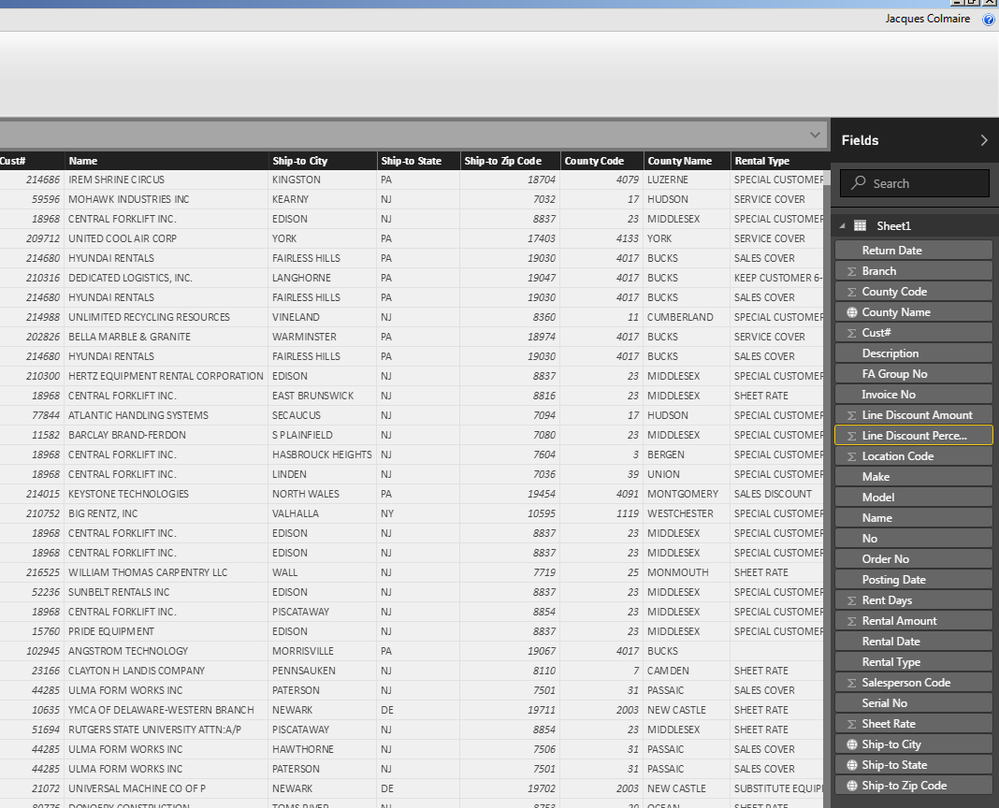
I have a spreadsheet with 'Ship- to City', 'Ship-to State', 'Ship-to Zip Code', & 'County Name'.
I modeled the data with the correct Data Categories for the respective columns listed above i.e. County Name has a Data Category of County, Ship-To City has a Data Category of City, Ship-To Zip has a Data Category of Zip Code, Ship-to State has a Data Category of State.
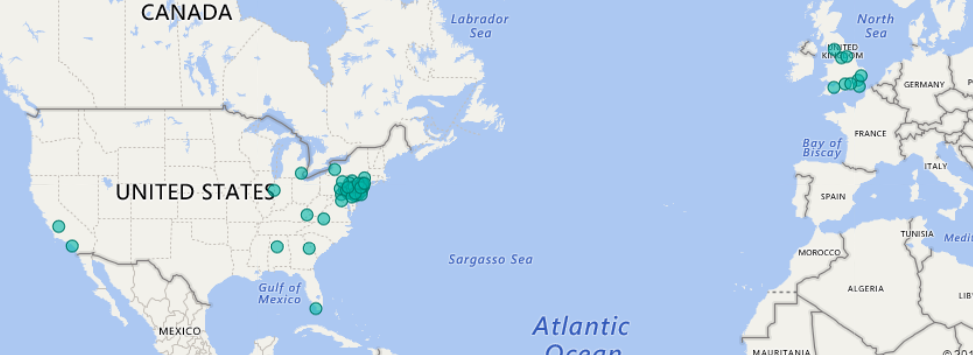
I want my map visualization to saturation by County. Obviously when I use the County column as my Location, I get erroneoous resuilts. My results should stay within the correct State & Zip Code. How do I group this information together so the saturation is correct? I'm assuming I need to create a calcuated column that has a combination of City, State, Zip, & County?
Can someone show me how to do that?
Picture showing current saturation using JUST 'County' with saturation in other Countries:
Above is the snapshot of the data columns.
Also, why does the Zip Code column lose the preceding 0? If other words, if a Zip Code starts with a 0 is does not show the 0. Can I get that to populate? Thank you.
Try concatenating your geo fields, here are few links for your reference:
https://community.powerbi.com/t5/Desktop/Incorrect-map-location/td-p/19374
Subscribe to the @PowerBIHowTo YT channel for an upcoming video on List and Record functions in Power Query!!
Learn Power BI and Fabric - subscribe to our YT channel - Click here: @PowerBIHowTo
If my solution proved useful, I'd be delighted to receive Kudos. When you put effort into asking a question, it's equally thoughtful to acknowledge and give Kudos to the individual who helped you solve the problem. It's a small gesture that shows appreciation and encouragement! ❤
Did I answer your question? Mark my post as a solution. Proud to be a Super User! Appreciate your Kudos 🙂
Feel free to email me with any of your BI needs.
The Power BI Data Visualization World Championships is back! Get ahead of the game and start preparing now!
| User | Count |
|---|---|
| 46 | |
| 42 | |
| 34 | |
| 31 | |
| 21 |
| User | Count |
|---|---|
| 133 | |
| 126 | |
| 95 | |
| 80 | |
| 65 |