Join us at FabCon Atlanta from March 16 - 20, 2026, for the ultimate Fabric, Power BI, AI and SQL community-led event. Save $200 with code FABCOMM.
Register now!The Power BI Data Visualization World Championships is back! Get ahead of the game and start preparing now! Learn more
Hi,
I am having trouble trying to find a solution for the following issue,
I have 4 tables named in my SQL database
1- Company (primary key Company_ID)
2- Opportunity(Company_ID as a reference to Company Table)
3- Lead(Company_ID as a reference to Company Table)
4- Incidents(Company_ID as a reference to Company Table)
I would like to build a power BI dashboard on all 4 tables joined as 1 where I select the company_ID and it shows me all the Opportunities, Leads and Incidents for that company. Please, can someone advise if this is possible to do in Power BI query editor or any other way to do this?
Solved! Go to Solution.
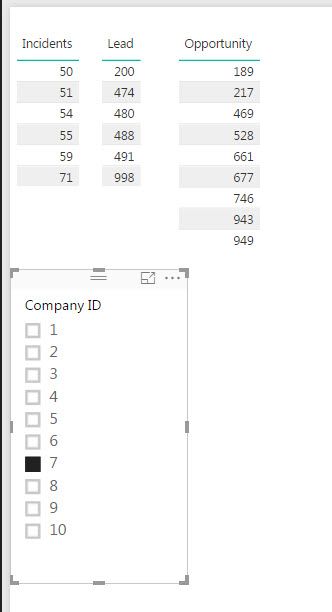
Is having these four tables combined into one table necessary? If not, you could simply join all four tables on Company ID, and then add three tables into the PowerBI Report page and add a slicer for Company ID. It would look something like this:
HI @ahsanlhcgov,
>>Please, can someone advise if this is possible to do in Power BI query editor or any other way to do this?
For merge tables, you can try to use Table.Join function.
In my opinion, I'm not so recommend you to merge all tables to one, it will generate lots of duplicate records.(affect performance)
You can try to modify all 'cross filter direction' options to 'both', then use Company[Company_ID], Opportunity columns, Lead columns, Incidents columns to create a table visual and use Company[Company_ID] to create a slicer visual as filter.
Notice: please use company table's 'company id' as the key column, drag related detail columns from other tables.(not need 'company id' columns from other table)
Regards,
Xiaoxin Sheng
Is having these four tables combined into one table necessary? If not, you could simply join all four tables on Company ID, and then add three tables into the PowerBI Report page and add a slicer for Company ID. It would look something like this:
The Power BI Data Visualization World Championships is back! Get ahead of the game and start preparing now!
| User | Count |
|---|---|
| 39 | |
| 37 | |
| 33 | |
| 32 | |
| 29 |
| User | Count |
|---|---|
| 133 | |
| 88 | |
| 85 | |
| 68 | |
| 64 |