cancel
Showing results for 
Search instead for 
Did you mean: 

The Power BI Data Visualization World Championships is back! Get ahead of the game and start preparing now! Learn more

Reply
LUCASM
Helper IV
Helper IV

Multi Line and Column chart

It’s been 2 years since I worked on creating any Power BI reports and it seems I've forgotten nearly everything, which is driving me nuts.
I thought I'd pick on one of our easy excel reports to convert to Power BI to demo to the new business unit I am in, and now I've found myself in a pickle.
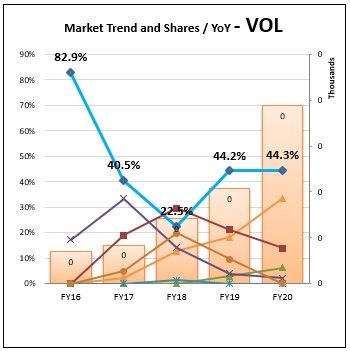
All I am trying to do is recreate a chart with 6 lines to show our and the top 6 competitors market share over 5 years and a column to show the total volume sales each year.
Simple in Excel and when I agreed to take this on, I thought it would be even simpler in Power BI.
I've got the Top 6 and their percentage share working correctly and as line chart it’s all good, but when I attempt to change this, to a multi chart it appends all the line together into a single line and breaks the Volume sales by competitor, I literally need the complete opposite.

Any ideas?


Chart.jpg


2 REPLIES 2
amitchandak
Super User
Super User

@LUCASM ,The information you have provided is not making the problem clear to me. Can you please explain with an example.

Appreciate your Kudos.

Share with Power BI Enthusiasts: Full Power BI Video (20 Hours) YouTube
Microsoft Fabric Series 60+ Videos YouTube
Microsoft Fabric Hindi End to End YouTube

Hi @amitchandak 


It's easy to forget that the question may be easy for the user to understand...

I need to create a combo chart in Power BI

The combo Chart consists of

  • Fiscal year volume in Columns
  • Volume share of the top 6 in the Market as Lines in the same chart

- as shown in my initial question above

I have the DAX code all created to produce the Volume Share numbers

I am just struggeling to work out how can produce this combo chart.

We use this style of chart a lot.

My next project is to produce another Power Bi report which currectly has around 70 of these 

But I cannot work out how to do this.

If it helps I'll create a pbix file.

Let me know

Helpful resources

Announcements
Power BI DataViz World Championships

Power BI Dataviz World Championships

The Power BI Data Visualization World Championships is back! Get ahead of the game and start preparing now!

December 2025 Power BI Update Carousel

Power BI Monthly Update - December 2025

Check out the December 2025 Power BI Holiday Recap!

FabCon Atlanta 2026 carousel

FabCon Atlanta 2026

Join us at FabCon Atlanta, March 16-20, for the ultimate Fabric, Power BI, AI and SQL community-led event. Save $200 with code FABCOMM.