cancel
Showing results for 
Search instead for 
Did you mean: 

We've captured the moments from FabCon & SQLCon that everyone is talking about, and we are bringing them to the community, live and on-demand. Starts on April 14th. Register now

Reply
amirghaderi
Helper IV
Helper IV

Moving Sum

Hi,

I am looking for moving 3 weeks sum measure for a column value. Example as below:

Can anybody help?


Record

Date

EV

Moving Sum

RESULT

A

2/04/2021

1000

A

1000

B

9/04/2021

1500

B+A

2500

C

16/04/2021

1200

C+B+A

3700

D

23/04/2021

1700

D+C+B

4400

E

30/04/2021

500

E+D+C

3400

F

7/05/2021

600

F+E+D

2800

G

14/05/2021

900

G+F+E

2000


1 ACCEPTED SOLUTION

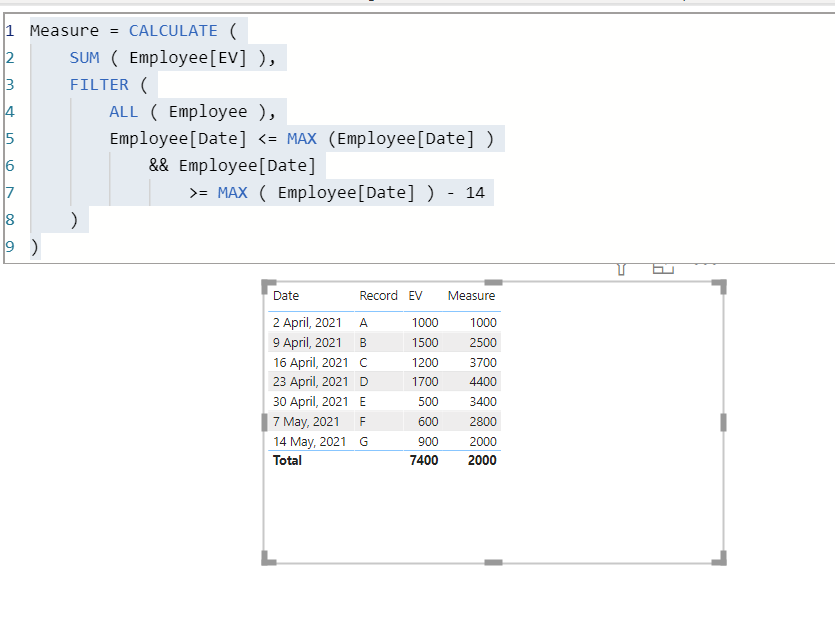
@amirghaderi  as per the informtation provided and data attached in very first post I used that and generated the expected result. See the screen shot below:

Capture.PNG


Don't forget to give thumbs up and accept this as a solution if it helped you!!!

Please take a quick glance at newly created dashboards : Restaurant Management Dashboard , HR Analytics Report , Hotel Management Report, Sales Analysis Report , Fortune 500 Companies Analysis , Revenue Tracking Dashboard

View solution in original post

5 REPLIES 5
amirghaderi
Helper IV
Helper IV

One more question,

If I want in another measure, only the MA for last period comes and every previous period becomes zero, then how to chnage the filter?

For example, in the above table, I want to see MA calculated for period 16-Apr-2021 and zero for everything else.


Tahreem24
Super User
Super User

@amirghaderi  try this DAX measure:

Measure = CALCULATE (SUM ( TableName[EV] ),FILTER (ALL ( TableName ),TableName[Date] <= MAX (TableName[Date])
&& TableName[Date] = MAX ( TableName[Date] ) - 14))
 
Don't forget to give thumbs up and accept this as a solution if it helped you!!!

Please take a quick glance at newly created dashboards : Restaurant Management Dashboard , HR Analytics Report , Hotel Management Report, Sales Analysis Report , Fortune 500 Companies Analysis , Revenue Tracking Dashboard

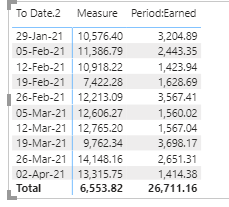
The numbers dont make sense. any idea why?

Measure = CALCULATE (SUM ( Source[Period:Earned] ),FILTER (ALL ( Source ),Source[To Date.2] <= MAX (Source[To Date.2]) && (Source[To Date.2] >= MAX ( (Source[To Date.2]))-14)))

amirghaderi_0-1619081248019.png


@amirghaderi  as per the informtation provided and data attached in very first post I used that and generated the expected result. See the screen shot below:

Capture.PNG


Don't forget to give thumbs up and accept this as a solution if it helped you!!!

Please take a quick glance at newly created dashboards : Restaurant Management Dashboard , HR Analytics Report , Hotel Management Report, Sales Analysis Report , Fortune 500 Companies Analysis , Revenue Tracking Dashboard

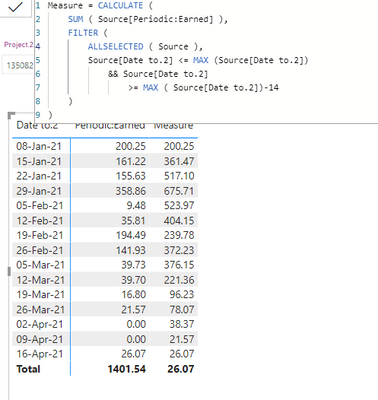
Thanks, It worked. I only chnaged the filter to Allselected to make sure the filter applied to the report works on measure as well.

amirghaderi_0-1619144987580.png


Helpful resources

Announcements
New to Fabric survey Carousel

New to Fabric Survey

If you have recently started exploring Fabric, we'd love to hear how it's going. Your feedback can help with product improvements.

Power BI DataViz World Championships carousel

Power BI DataViz World Championships - June 2026

A new Power BI DataViz World Championship is coming this June! Don't miss out on submitting your entry.

Join our Fabric User Panel

Join our Fabric User Panel

Share feedback directly with Fabric product managers, participate in targeted research studies and influence the Fabric roadmap.

March Power BI Update Carousel

Power BI Community Update - March 2026

Check out the March 2026 Power BI update to learn about new features.