cancel
Showing results for 
Search instead for 
Did you mean: 

The Power BI Data Visualization World Championships is back! Get ahead of the game and start preparing now! Learn more

Reply
Anonymous
Not applicable

Creating a Measured Filter

I am looking at subcriptions and I want to see how many active subscriptions we have.


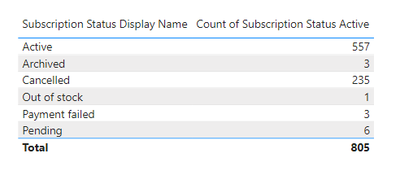
In my column we have the following

DomWest_0-1619013562607.png

What I need to do is create a measure which deducts all of the display names except 'Active' from 'Active' what sort of formula could I use?


Thanks!


1 ACCEPTED SOLUTION
Anonymous
Not applicable

Hi @Anonymous ,

There are two ways to get the data you want. You can refer to either of the two .

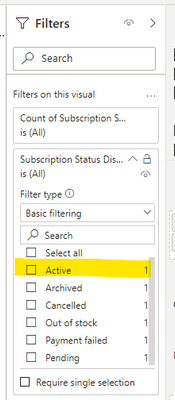
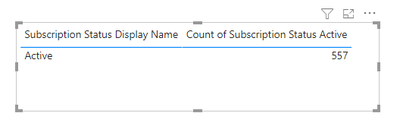
(1)A simpler way is setting in Visual filter .You can select Active and the return value is what you want .

Ailsa-msft_0-1619158310427.png

Ailsa-msft_1-1619158310428.png

(2)Create a measure like:

active = CALCULATE(SELECTEDVALUE('Table'[Count of Subscription Status Active]),FILTER('Table','Table'[Subscription Status Display Name]="Active"))


And add a card to display the return value .

Ailsa-msft_2-1619158310429.png

Best Regards

Community Support Team _ Ailsa Tao


If this post helps, then please consider Accept it as the solution to help the other members find it more quickly.

View solution in original post

4 REPLIES 4
Anonymous
Not applicable

Hi @Anonymous ,

There are two ways to get the data you want. You can refer to either of the two .

(1)A simpler way is setting in Visual filter .You can select Active and the return value is what you want .

Ailsa-msft_0-1619158310427.png

Ailsa-msft_1-1619158310428.png

(2)Create a measure like:

active = CALCULATE(SELECTEDVALUE('Table'[Count of Subscription Status Active]),FILTER('Table','Table'[Subscription Status Display Name]="Active"))


And add a card to display the return value .

Ailsa-msft_2-1619158310429.png

Best Regards

Community Support Team _ Ailsa Tao


If this post helps, then please consider Accept it as the solution to help the other members find it more quickly.

sanalytics
Super User
Super User

@Anonymous 


is your Subscription status display Name column or measure?

if it is a column then a simple filter will do your job


Calculate([ count of subscription status active],Subscription status display Name ="Active")


Regards

Sanalytics

Anonymous
Not applicable

It's a column! 🙂


With the calculate function how would I filter for one result and then deduct all the others?


e.g. 'Active' - (Archived + Cancelled + Out of stock + Payment Failed + Pending)?

DataVitalizer
Solution Sage
Solution Sage

Hi @Anonymous 

Have you tried applying a filter on that visual from the filter tab?


Did it work ? Mark it as a solution to help spreading knowledge.

A kudos would be appreciated  

Helpful resources

Announcements
Power BI DataViz World Championships

Power BI Dataviz World Championships

The Power BI Data Visualization World Championships is back! Get ahead of the game and start preparing now!

December 2025 Power BI Update Carousel

Power BI Monthly Update - December 2025

Check out the December 2025 Power BI Holiday Recap!

FabCon Atlanta 2026 carousel

FabCon Atlanta 2026

Join us at FabCon Atlanta, March 16-20, for the ultimate Fabric, Power BI, AI and SQL community-led event. Save $200 with code FABCOMM.