cancel
Showing results for 
Search instead for 
Did you mean: 

Learn from the best! Meet the four finalists headed to the FINALS of the Power BI Dataviz World Championships! Register now

Reply
Rotergnom2
Regular Visitor

Moving Average

Hey,


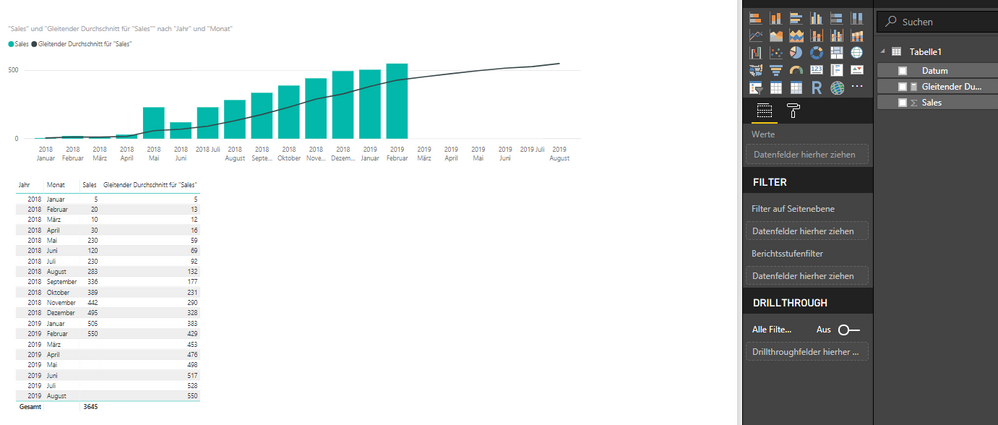
I tried to go for the Moving Average building with PowerBI. 


The problem is that the moving average is calculated for the future, which does not make any sense. 

I wanted to do a six-month-rolling average with the quick measure (problem of above appeared), then with the formula = calculate(average([Sales]), DatesInPeriod([date];Lastdate([date]), -6, MONTH). Same Problem, again. So I do not know what is the problem. Perhaps somebody could offer me a simple sample PBIX data with a 6 month moving average over 2 years data..


Unbenannt.PNG

1 ACCEPTED SOLUTION
v-jiascu-msft
Microsoft Employee
Microsoft Employee

Hi @Rotergnom2,


I would suggest you create a date table in your scenario. Please check out the attached demo and the measure below.

Measure =
VAR maxFactDate =
    CALCULATE ( MAX ( FactTable[Date] ), ALL ( 'Calendar' ) )
RETURN
    IF (
        MAX ( 'Calendar'[Date] ) > maxFactDate,
        BLANK (),
        CALCULATE (
            AVERAGEX (
                SUMMARIZE (
                    'FactTable',
                    'Calendar'[Date].[Year],
                    'Calendar'[Date].[Month],
                    "MonthTotal", SUM ( FactTable[Sales] )
                ),
                [MonthTotal]
            ),
            DATESINPERIOD ( 'Calendar'[date], LASTDATE ( 'Calendar'[date] ), -6, MONTH )
        )
    )

Best Regards,

Dale

Community Support Team _ Dale
If this post helps, then please consider Accept it as the solution to help the other members find it more quickly.

View solution in original post

3 REPLIES 3
v-jiascu-msft
Microsoft Employee
Microsoft Employee

Hi @Rotergnom2,


Could you please mark the proper answer as a solution?


Best Regards,

Dale

Community Support Team _ Dale
If this post helps, then please consider Accept it as the solution to help the other members find it more quickly.
v-jiascu-msft
Microsoft Employee
Microsoft Employee

Hi @Rotergnom2,


I would suggest you create a date table in your scenario. Please check out the attached demo and the measure below.

Measure =
VAR maxFactDate =
    CALCULATE ( MAX ( FactTable[Date] ), ALL ( 'Calendar' ) )
RETURN
    IF (
        MAX ( 'Calendar'[Date] ) > maxFactDate,
        BLANK (),
        CALCULATE (
            AVERAGEX (
                SUMMARIZE (
                    'FactTable',
                    'Calendar'[Date].[Year],
                    'Calendar'[Date].[Month],
                    "MonthTotal", SUM ( FactTable[Sales] )
                ),
                [MonthTotal]
            ),
            DATESINPERIOD ( 'Calendar'[date], LASTDATE ( 'Calendar'[date] ), -6, MONTH )
        )
    )

Best Regards,

Dale

Community Support Team _ Dale
If this post helps, then please consider Accept it as the solution to help the other members find it more quickly.
Greg_Deckler
Community Champion
Community Champion

So, is your calculation correct other than the fact that it includes future estimations?


Follow on LinkedIn
@ me in replies or I'll lose your thread!!!
Instead of a Kudo, please vote for this idea
Become an expert!: Enterprise DNA
External Tools: MSHGQM
YouTube Channel!: Microsoft Hates Greg
Latest book!:
DAX For Humans

DAX is easy, CALCULATE makes DAX hard...

Helpful resources

Announcements
Join our Fabric User Panel

Join our Fabric User Panel

Share feedback directly with Fabric product managers, participate in targeted research studies and influence the Fabric roadmap.

March Power BI Update Carousel

Power BI Community Update - March 2026

Check out the March 2026 Power BI update to learn about new features.