FabCon is coming to Atlanta
Join us at FabCon Atlanta from March 16 - 20, 2026, for the ultimate Fabric, Power BI, AI and SQL community-led event. Save $200 with code FABCOMM.
Register now!- Power BI forums
- Get Help with Power BI
- Desktop
- Service
- Report Server
- Power Query
- Mobile Apps
- Developer
- DAX Commands and Tips
- Custom Visuals Development Discussion
- Health and Life Sciences
- Power BI Spanish forums
- Translated Spanish Desktop
- Training and Consulting
- Instructor Led Training
- Dashboard in a Day for Women, by Women
- Galleries
- Data Stories Gallery
- Themes Gallery
- Contests Gallery
- QuickViz Gallery
- Quick Measures Gallery
- Visual Calculations Gallery
- Notebook Gallery
- Translytical Task Flow Gallery
- TMDL Gallery
- R Script Showcase
- Webinars and Video Gallery
- Ideas
- Custom Visuals Ideas (read-only)
- Issues
- Issues
- Events
- Upcoming Events
The Power BI Data Visualization World Championships is back! Get ahead of the game and start preparing now! Learn more
- Power BI forums
- Forums
- Get Help with Power BI
- Desktop
- Re: Moving Average in Tooltip Page - Date Filter C...
- Subscribe to RSS Feed
- Mark Topic as New
- Mark Topic as Read
- Float this Topic for Current User
- Bookmark
- Subscribe
- Printer Friendly Page


- Mark as New
- Bookmark
- Subscribe
- Mute
- Subscribe to RSS Feed
- Permalink
- Report Inappropriate Content
Moving Average in Tooltip Page - Date Filter Context?
Good Afternoon,
I am working with Moving Average calculations. In my time series charts, everything works as it should.
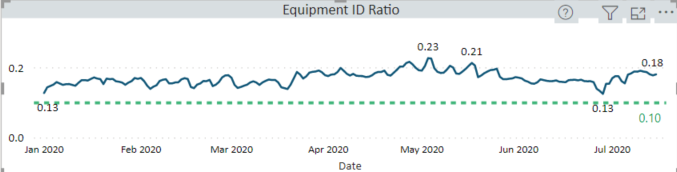
I am creating a custom Tooltip Page showing data for each date. My issue is with the Date Context. When I hover over a specific data point, I believe it is only using the current date context and hence does not display the correct result. The correct value for the 3 Day Moving Average for this date is 0.23. However, what I believe is happening is the tooltip is "filtered" for a single data point, and hence it is throwing back the actual result for that single day. Appears I am losing the context of the previous 2 days.
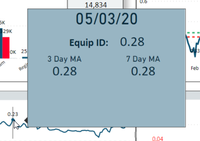
I am using the Advanced Card Visual for my Tooltip Page, but am flexible with this choice. Hoping someone may have a suggestion to get around this issue.
Thanks in advance and Best Regards to All,
Solved! Go to Solution.

- Mark as New
- Bookmark
- Subscribe
- Mute
- Subscribe to RSS Feed
- Permalink
- Report Inappropriate Content
@rsbin , are using a formula like
Rolling 3 = CALCULATE(sum(Sales[Sales Amount]),DATESINPERIOD('Date'[Date],MAX(Sales[Sales Date]),-3,Day))/3
with the date table?
- Mark as New
- Bookmark
- Subscribe
- Mute
- Subscribe to RSS Feed
- Permalink
- Report Inappropriate Content
@rsbin , are using a formula like
Rolling 3 = CALCULATE(sum(Sales[Sales Amount]),DATESINPERIOD('Date'[Date],MAX(Sales[Sales Date]),-3,Day))/3
with the date table?
- Mark as New
- Bookmark
- Subscribe
- Mute
- Subscribe to RSS Feed
- Permalink
- Report Inappropriate Content
I am using a combination of 3 formulas. Tried several different variations from the Forum and found this works best.
3DayEquipID =
Var _Length = 3
Var _CurrentIndex = MAX('GeneralStatistics'[GSIndex])
Var _PrevIndex = _CurrentIndex - _Length
RETURN
If (_CurrentIndex >= _Length,
   Sumx(Filter(ALLSELECTED('GeneralStatistics'),
               _CurrentIndex >= 'GeneralStatistics'[GSIndex] && _PrevIndex < 'GeneralStatistics'[GSIndex]),
               'Work Item Measures'[EquipmentIDCount]))
Used a simlar one to calculate 3Day Visits, then using this:
EquipID3DayMA = [3DayEquipID]/[3DayVisits]I do have a Calendar Table linked to my GeneralStatistics table.
- Mark as New
- Bookmark
- Subscribe
- Mute
- Subscribe to RSS Feed
- Permalink
- Report Inappropriate Content
@rsbin , As your tooltip, is getting only 1 date, your allselected will not go beyond that
add removefilters('GeneralStatistics'[GSIndex])
3DayEquipID =
Var _Length = 3
Var _CurrentIndex = MAX('GeneralStatistics'[GSIndex])
Var _PrevIndex = _CurrentIndex - _Length
RETURN
If (_CurrentIndex >= _Length,
   Sumx(Filter(ALLSELECTED('GeneralStatistics'),
               _CurrentIndex >= 'GeneralStatistics'[GSIndex] && _PrevIndex < 'GeneralStatistics'[GSIndex]),
               'Work Item Measures'[EquipmentIDCount]), removefilters('GeneralStatistics'[GSIndex]))
https://www.linkedin.com/pulse/five-recent-power-bi-functions-you-should-use-more-often-amit-chandak
- Mark as New
- Bookmark
- Subscribe
- Mute
- Subscribe to RSS Feed
- Permalink
- Report Inappropriate Content
Thanks much for the suggestion. However, am getting the following error message:
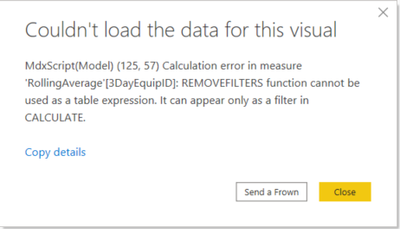
Thinking it doesn't like the SUMX???
- Mark as New
- Bookmark
- Subscribe
- Mute
- Subscribe to RSS Feed
- Permalink
- Report Inappropriate Content
@rsbin , try like
3DayEquipID =
Var _Length = 3
Var _CurrentIndex = MAX('GeneralStatistics'[GSIndex])
Var _PrevIndex = _CurrentIndex - _Length
RETURN
If (_CurrentIndex >= _Length,
   calculate(Sumx(Filter(ALLSELECTED('GeneralStatistics'),
               _CurrentIndex >= 'GeneralStatistics'[GSIndex] && _PrevIndex < 'GeneralStatistics'[GSIndex]),
'Work Item Measures'[EquipmentIDCount]), removefilters('GeneralStatistics'[GSIndex])))- Mark as New
- Bookmark
- Subscribe
- Mute
- Subscribe to RSS Feed
- Permalink
- Report Inappropriate Content
Proving to be a little bit of a challenge. Really appreciate your efforts with this one.
Your last correction solved the error, so thanks for that. Unfortunately, the behaviour is still the same when I test it in the Tooltip. It seems to be only calculating based on the single day. Below is a sample data set.
It's almost like I have to force it to do a calculation for the selected day + the 2 prior days.
| Date | EquipmentIDCount | TotalVisits | EquipmentIDRatio | 3DayEquipID A | 3DayVisits | 3DMA_EquipID |
| 8/1/2019 | 3085 | 13555 | 0.228 | |||
| 8/2/2019 | 2936 | 13524 | 0.217 | |||
| 8/3/2019 | 1037 | 4997 | 0.208 | 7058 | 32076 | 0.22 |
| 8/4/2019 | 637 | 3326 | 0.192 | 4610 | 21847 | 0.211 |
| 8/5/2019 | 2328 | 8619 | 0.27 | 4002 | 16942 | 0.236 |
| 8/6/2019 | 2914 | 14599 | 0.2 | 5879 | 26544 | 0.221 |
| 8/7/2019 | 3002 | 14383 | 0.209 | 8244 | 37601 | 0.219 |
| 8/8/2019 | 3077 | 14192 | 0.217 | 8993 | 43174 | 0.208 |
| 8/9/2019 | 3088 | 13961 | 0.221 | 9167 | 42536 | 0.216 |
| 8/10/2019 | 1551 | 6366 | 0.244 | 7716 | 34519 | 0.224 |
| 8/11/2019 | 953 | 3999 | 0.238 | 5592 | 24326 | 0.23 |
| 8/12/2019 | 2560 | 12969 | 0.197 | 5064 | 23334 | 0.217 |
| 8/13/2019 | 2715 | 14289 | 0.19 | 6228 | 31257 | 0.199 |
| 8/14/2019 | 3171 | 13922 | 0.228 | 8446 | 41180 | 0.205 |
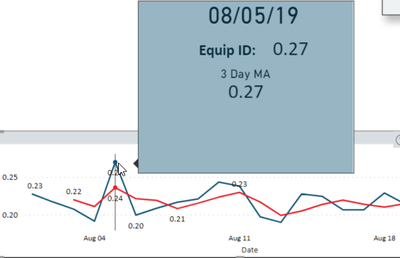
The Blue Line is EquipmentID Ratio and Red Line is the 3 Day MA.
As you can see, Tooltip seems to be considering only 1 day. Any further suggestions are of course much appreciated.
Best Regards,
- Mark as New
- Bookmark
- Subscribe
- Mute
- Subscribe to RSS Feed
- Permalink
- Report Inappropriate Content
After more testing and trial and error, I think I can get this to work properly by using your original Moving Average formula, albeit in a modified form. One of the reasons I went with using the [GSIndex] is that it ensures there are at least 3 data points before calculating the first Moving Average. Using your format in a quick test, I get the following:

By calculating the average first, rather than the sum....I think I can get to the right solution.
Thank you for getting me on the right track. Kudos to you for your time.
Have a great weekend and Kindest Regards,

Helpful resources

Power BI Dataviz World Championships
The Power BI Data Visualization World Championships is back! Get ahead of the game and start preparing now!

Power BI Monthly Update - November 2025
Check out the November 2025 Power BI update to learn about new features.

FabCon Atlanta 2026
Join us at FabCon Atlanta, March 16-20, for the ultimate Fabric, Power BI, AI and SQL community-led event. Save $200 with code FABCOMM.

| User | Count |
|---|---|
| 59 | |
| 43 | |
| 42 | |
| 23 | |
| 17 |


| User | Count |
|---|---|
| 190 | |
| 122 | |
| 96 | |
| 66 | |
| 47 |


