FabCon is coming to Atlanta
Join us at FabCon Atlanta from March 16 - 20, 2026, for the ultimate Fabric, Power BI, AI and SQL community-led event. Save $200 with code FABCOMM.
Register now!- Power BI forums
- Get Help with Power BI
- Desktop
- Service
- Report Server
- Power Query
- Mobile Apps
- Developer
- DAX Commands and Tips
- Custom Visuals Development Discussion
- Health and Life Sciences
- Power BI Spanish forums
- Translated Spanish Desktop
- Training and Consulting
- Instructor Led Training
- Dashboard in a Day for Women, by Women
- Galleries
- Data Stories Gallery
- Themes Gallery
- Contests Gallery
- QuickViz Gallery
- Quick Measures Gallery
- Visual Calculations Gallery
- Notebook Gallery
- Translytical Task Flow Gallery
- TMDL Gallery
- R Script Showcase
- Webinars and Video Gallery
- Ideas
- Custom Visuals Ideas (read-only)
- Issues
- Issues
- Events
- Upcoming Events
The Power BI Data Visualization World Championships is back! Get ahead of the game and start preparing now! Learn more
- Power BI forums
- Forums
- Get Help with Power BI
- Desktop
- Moving Average in Tooltip Page - Date Filter Conte...
- Subscribe to RSS Feed
- Mark Topic as New
- Mark Topic as Read
- Float this Topic for Current User
- Bookmark
- Subscribe
- Printer Friendly Page


- Mark as New
- Bookmark
- Subscribe
- Mute
- Subscribe to RSS Feed
- Permalink
- Report Inappropriate Content
Moving Average in Tooltip Page - Date Filter Context?
Good Afternoon,
I am working with Moving Average calculations. In my time series charts, everything works as it should.
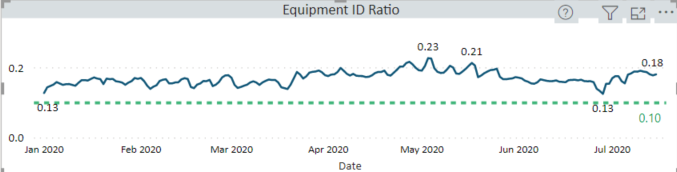
I am creating a custom Tooltip Page showing data for each date. My issue is with the Date Context. When I hover over a specific data point, I believe it is only using the current date context and hence does not display the correct result. The correct value for the 3 Day Moving Average for this date is 0.23. However, what I believe is happening is the tooltip is "filtered" for a single data point, and hence it is throwing back the actual result for that single day. Appears I am losing the context of the previous 2 days.
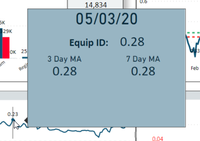
I am using the Advanced Card Visual for my Tooltip Page, but am flexible with this choice. Hoping someone may have a suggestion to get around this issue.
Thanks in advance and Best Regards to All,
Solved! Go to Solution.

- Mark as New
- Bookmark
- Subscribe
- Mute
- Subscribe to RSS Feed
- Permalink
- Report Inappropriate Content
@rsbin , are using a formula like
Rolling 3 = CALCULATE(sum(Sales[Sales Amount]),DATESINPERIOD('Date'[Date],MAX(Sales[Sales Date]),-3,Day))/3
with the date table?
- Mark as New
- Bookmark
- Subscribe
- Mute
- Subscribe to RSS Feed
- Permalink
- Report Inappropriate Content
@rsbin , are using a formula like
Rolling 3 = CALCULATE(sum(Sales[Sales Amount]),DATESINPERIOD('Date'[Date],MAX(Sales[Sales Date]),-3,Day))/3
with the date table?
- Mark as New
- Bookmark
- Subscribe
- Mute
- Subscribe to RSS Feed
- Permalink
- Report Inappropriate Content
I am using a combination of 3 formulas. Tried several different variations from the Forum and found this works best.
3DayEquipID =
Var _Length = 3
Var _CurrentIndex = MAX('GeneralStatistics'[GSIndex])
Var _PrevIndex = _CurrentIndex - _Length
RETURN
If (_CurrentIndex >= _Length,
   Sumx(Filter(ALLSELECTED('GeneralStatistics'),
               _CurrentIndex >= 'GeneralStatistics'[GSIndex] && _PrevIndex < 'GeneralStatistics'[GSIndex]),
               'Work Item Measures'[EquipmentIDCount]))
Used a simlar one to calculate 3Day Visits, then using this:
EquipID3DayMA = [3DayEquipID]/[3DayVisits]I do have a Calendar Table linked to my GeneralStatistics table.
- Mark as New
- Bookmark
- Subscribe
- Mute
- Subscribe to RSS Feed
- Permalink
- Report Inappropriate Content
@rsbin , As your tooltip, is getting only 1 date, your allselected will not go beyond that
add removefilters('GeneralStatistics'[GSIndex])
3DayEquipID =
Var _Length = 3
Var _CurrentIndex = MAX('GeneralStatistics'[GSIndex])
Var _PrevIndex = _CurrentIndex - _Length
RETURN
If (_CurrentIndex >= _Length,
   Sumx(Filter(ALLSELECTED('GeneralStatistics'),
               _CurrentIndex >= 'GeneralStatistics'[GSIndex] && _PrevIndex < 'GeneralStatistics'[GSIndex]),
               'Work Item Measures'[EquipmentIDCount]), removefilters('GeneralStatistics'[GSIndex]))
https://www.linkedin.com/pulse/five-recent-power-bi-functions-you-should-use-more-often-amit-chandak
- Mark as New
- Bookmark
- Subscribe
- Mute
- Subscribe to RSS Feed
- Permalink
- Report Inappropriate Content
Thanks much for the suggestion. However, am getting the following error message:
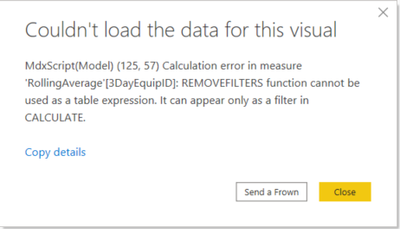
Thinking it doesn't like the SUMX???
- Mark as New
- Bookmark
- Subscribe
- Mute
- Subscribe to RSS Feed
- Permalink
- Report Inappropriate Content
@rsbin , try like
3DayEquipID =
Var _Length = 3
Var _CurrentIndex = MAX('GeneralStatistics'[GSIndex])
Var _PrevIndex = _CurrentIndex - _Length
RETURN
If (_CurrentIndex >= _Length,
   calculate(Sumx(Filter(ALLSELECTED('GeneralStatistics'),
               _CurrentIndex >= 'GeneralStatistics'[GSIndex] && _PrevIndex < 'GeneralStatistics'[GSIndex]),
'Work Item Measures'[EquipmentIDCount]), removefilters('GeneralStatistics'[GSIndex])))- Mark as New
- Bookmark
- Subscribe
- Mute
- Subscribe to RSS Feed
- Permalink
- Report Inappropriate Content
Proving to be a little bit of a challenge. Really appreciate your efforts with this one.
Your last correction solved the error, so thanks for that. Unfortunately, the behaviour is still the same when I test it in the Tooltip. It seems to be only calculating based on the single day. Below is a sample data set.
It's almost like I have to force it to do a calculation for the selected day + the 2 prior days.
| Date | EquipmentIDCount | TotalVisits | EquipmentIDRatio | 3DayEquipID A | 3DayVisits | 3DMA_EquipID |
| 8/1/2019 | 3085 | 13555 | 0.228 | |||
| 8/2/2019 | 2936 | 13524 | 0.217 | |||
| 8/3/2019 | 1037 | 4997 | 0.208 | 7058 | 32076 | 0.22 |
| 8/4/2019 | 637 | 3326 | 0.192 | 4610 | 21847 | 0.211 |
| 8/5/2019 | 2328 | 8619 | 0.27 | 4002 | 16942 | 0.236 |
| 8/6/2019 | 2914 | 14599 | 0.2 | 5879 | 26544 | 0.221 |
| 8/7/2019 | 3002 | 14383 | 0.209 | 8244 | 37601 | 0.219 |
| 8/8/2019 | 3077 | 14192 | 0.217 | 8993 | 43174 | 0.208 |
| 8/9/2019 | 3088 | 13961 | 0.221 | 9167 | 42536 | 0.216 |
| 8/10/2019 | 1551 | 6366 | 0.244 | 7716 | 34519 | 0.224 |
| 8/11/2019 | 953 | 3999 | 0.238 | 5592 | 24326 | 0.23 |
| 8/12/2019 | 2560 | 12969 | 0.197 | 5064 | 23334 | 0.217 |
| 8/13/2019 | 2715 | 14289 | 0.19 | 6228 | 31257 | 0.199 |
| 8/14/2019 | 3171 | 13922 | 0.228 | 8446 | 41180 | 0.205 |
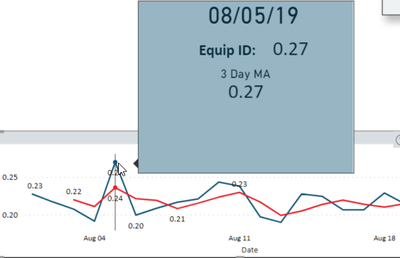
The Blue Line is EquipmentID Ratio and Red Line is the 3 Day MA.
As you can see, Tooltip seems to be considering only 1 day. Any further suggestions are of course much appreciated.
Best Regards,
- Mark as New
- Bookmark
- Subscribe
- Mute
- Subscribe to RSS Feed
- Permalink
- Report Inappropriate Content
After more testing and trial and error, I think I can get this to work properly by using your original Moving Average formula, albeit in a modified form. One of the reasons I went with using the [GSIndex] is that it ensures there are at least 3 data points before calculating the first Moving Average. Using your format in a quick test, I get the following:

By calculating the average first, rather than the sum....I think I can get to the right solution.
Thank you for getting me on the right track. Kudos to you for your time.
Have a great weekend and Kindest Regards,

Helpful resources

Power BI Monthly Update - November 2025
Check out the November 2025 Power BI update to learn about new features.

Fabric Data Days
Advance your Data & AI career with 50 days of live learning, contests, hands-on challenges, study groups & certifications and more!

FabCon Atlanta 2026
Join us at FabCon Atlanta, March 16-20, for the ultimate Fabric, Power BI, AI and SQL community-led event. Save $200 with code FABCOMM.


