This is best Fabric, Power BI, SQL and AI community event. How do we know? The last event sold out! Save €200 with code FABCMTY200.
Register nowA new Data Days event is coming soon! This time we’re going bigger than ever. Fabric, Power BI, SQL, AI and more. Don't miss out.
Hi All,
I'm having trouble finding out how I can portray the mode of a text/string value using DAX.
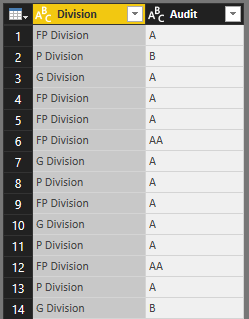
Below is a snippet of my data.
I want to be able to show the Audit result by Division based on the frequency of the result,
E.g.
FP Division = A
P Division = A
G Division = A
Any help on this!
Thanks
Hi @Peckle,
Just trying to understand your question. Do you need to see how many times a Division received A or AA in Audit?
Seeminlgy you need the most recurring audit for each division
Try this MEASURE
Measure =
VAR MaxCount =
MAXX ( VALUES ( Table1[Audit] ), CALCULATE ( COUNT ( Table1[Audit] ) ) )
RETURN
CONCATENATEX (
FILTER (
VALUES ( Table1[Audit] ),
CALCULATE ( COUNT ( Table1[Audit] ) ) = MaxCount
),
[Audit],
", "
)
Thanks, this worked for me (after trying many other approaches!)
That's right. I want to display the most recurring audit for each division
Thanks I'll try this!
Hi @Peckle,
Did you resolve your issue? If so, please kindly mark the corresponding reply as an answer. It will benifit others with relevant issues. If not, please feel free to ask. ![]()
Thanks,
Xi Jin.
Thanks for reaching out!
Unfortunately, I couldn't get the second part of the syntax to return a value.
Thanks
Hi @Peckle,
=> Unfortunately, I couldn't get the second part of the syntax to return a value.
Did you get any error message? Could you please share us some screenshots about your issue if possible?
Thanks,
Xi Jin.
Check out the May 2026 Power BI update to learn about new features.
Sign up to receive a private message when registration opens and key events begin.
If you have recently started exploring Fabric, we'd love to hear how it's going. Your feedback can help with product improvements.
| User | Count |
|---|---|
| 31 | |
| 26 | |
| 23 | |
| 22 | |
| 15 |
| User | Count |
|---|---|
| 63 | |
| 45 | |
| 28 | |
| 24 | |
| 22 |