cancel
Showing results for 
Search instead for 
Did you mean: 

Try your skills in the Power BI Dataviz World Championship! Round one ends June 26. Join now

Reply
Mandy22
Regular Visitor

More complicated Repeat Customer Pattern

I'll give an example of what I'm trying to acheive, with some background:


The data I pull is from 1/1/19 to current day. 


I'd like to see our repeat/return customers each month. I plan to display these in a monthly line graph and potentially a daily line graph using order_date as the x axis.


Example: When I click on January 19 in the graph, someone can qualify to be a repeat customer if she ordered a service on the 19th and on the 1st. When I click on the graph on January 1 in the graph, she should not appear--she had only booked one job at that point in time, so she was not a repeat customer at that time.


Does anyone know how to do this, or can point me in a good direction? I've only been using BI for 3 months.

1 ACCEPTED SOLUTION
Anonymous
Not applicable

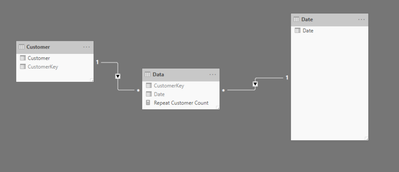
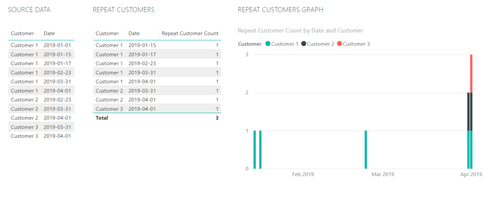
If you have a data model that looks similar to this:

2019-08-09_17h03_26.pngThen you can get the following output:

2019-08-09_16h59_21.png

Using this type of calculation:

Repeat Customer Count = 
CALCULATE (
    COUNTROWS ( 'Customer' ),
    FILTER (
        'Customer',
        CALCULATE (
            COUNTROWS ( VALUES ( 'Data'[Date] ) ),
            FILTER ( ALL ( 'Date'), 'Date'[Date] <= MAX ( 'Date'[Date] ) )
        ) > 1
        && CALCULATE(COUNTROWS('Data')) >= 1
    )
)

I have uploaded a sample workbook here: Sample Workbook


View solution in original post

2 REPLIES 2
Anonymous
Not applicable

If you have a data model that looks similar to this:

2019-08-09_17h03_26.pngThen you can get the following output:

2019-08-09_16h59_21.png

Using this type of calculation:

Repeat Customer Count = 
CALCULATE (
    COUNTROWS ( 'Customer' ),
    FILTER (
        'Customer',
        CALCULATE (
            COUNTROWS ( VALUES ( 'Data'[Date] ) ),
            FILTER ( ALL ( 'Date'), 'Date'[Date] <= MAX ( 'Date'[Date] ) )
        ) > 1
        && CALCULATE(COUNTROWS('Data')) >= 1
    )
)

I have uploaded a sample workbook here: Sample Workbook


Thank you for your solution--it worked!

Helpful resources

Announcements
Fabric Data Days is here Carousel

Fabric Data Days 2026

Don't miss out on Data Days, June 15 through August 7. Learn Fabric, Power BI, SQL, AI and more.

May Power BI Update Carousel

Power BI Monthly Update - May 2026

Check out the May 2026 Power BI update to learn about new features.

Power BI DataViz World Championships carousel

Power BI DataViz World Championships - June 2026

A new Power BI DataViz World Championship is coming this June! Don't miss out on submitting your entry.