Don't miss your chance to take the Fabric Data Engineer (DP-600) exam for FREE! Find out how by watching the DP-600 session on-demand now through April 28th.
Learn moreJoin the FabCon + SQLCon recap series. Up next: Power BI, Real-Time Intelligence, IQ and AI, and Data Factory take center stage. All sessions are available on-demand after the live show. Register now
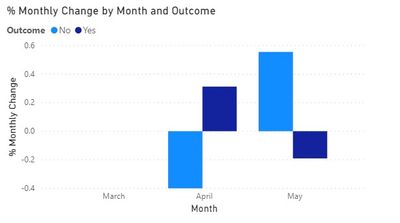
Hoping someone can help! Each month I receive a finance file, the total number of rows varies each month. The two columns of interest are financial_ref (which is a unique identifier for each month, though repeated across months) and outcome (which is either Yes or No). A 100% stacked bar chart can show the yes/no% each month (axis = date, value = count(financial_ref), legend = outcome), but what I'd also like is a chart which can show the % difference each month. So if 'No' was 48% in March and 50% in April, I'd like a chart which shows +2% for 'No' for April, being the increase from the previous month (and likewise shows -2% for 'Yes' for April). There's an additional column 'Category' which stakeholders would use to filter any visualisations built. No idea where to start...
Solved! Go to Solution.
Hi @Anonymous ,
assuming you have a Date table you can try these measures:
Total Outcome = CALCULATE(
COUNTA(Sheet1[Outcome]))Total Outcome Prev Month = CALCULATE(
[Total Outcome],DATEADD('Date'[Date],-1,MONTH))% Monthly Change = DIVIDE(
[Total Outcome] - [Total Outcome Prev Month],[Total Outcome Prev Month], 0)
Hope it helps.
Cheers,
Marco
Hi @Anonymous ,
check this out:
https://drive.google.com/file/d/1WD35GYlk-SWcSC-JRz8Gywbiyg1U_-Op/view?usp=sharing
Cheers,
Marco
@Anonymous , you can use time intelligence to get current and last month and then take diff of that
MTD Sales = CALCULATE(SUM(Sales[Sales Amount]),DATESMTD(Table[Date]))
last MTD Sales = CALCULATE(SUM(Sales[Sales Amount]),DATESMTD(dateadd(Table[Date],-1,MONTH)))
last MTD (complete) Sales = CALCULATE(SUM(Sales[Sales Amount]),DATESMTD(ENDOFMONTH(dateadd(Table[Date],-1,MONTH))))
last year MTD Sales = CALCULATE(SUM(Sales[Sales Amount]),DATESMTD(dateadd(Table[Date],-12,MONTH)))
last year MTD (complete) Sales = CALCULATE(SUM(Sales[Sales Amount]),DATESMTD(ENDOFMONTH(dateadd(Table[Date],-12,MONTH))))
Month behind Sales = CALCULATE(SUM(Sales[Sales Amount]),dateadd(Table[Date],-1,Month))
last QTR same Month (complete) Sales = CALCULATE(SUM(Sales[Sales Amount]),DATESMTD(ENDOFMONTH(dateadd(Table[Date],-1,Qtr))))
MTD (Year End) Sales = CALCULATE(SUM(Sales[Sales Amount]),DATESMTD(ENDOFYEAR(Table[Date])))
MTD (Last Year End) Sales = CALCULATE(SUM(Sales[Sales Amount]),DATESMTD(ENDOFYEAR(dateadd(Table[Date],-12,MONTH),"8/31")))
Hi @Anonymous ,
assuming you have a Date table you can try these measures:
Total Outcome = CALCULATE(
COUNTA(Sheet1[Outcome]))Total Outcome Prev Month = CALCULATE(
[Total Outcome],DATEADD('Date'[Date],-1,MONTH))% Monthly Change = DIVIDE(
[Total Outcome] - [Total Outcome Prev Month],[Total Outcome Prev Month], 0)
Hope it helps.
Cheers,
Marco
Hi @MarcoPessina ,
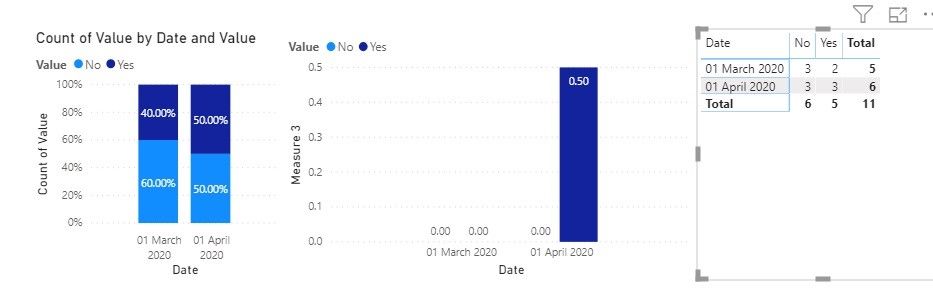
that table is exactly what I'd like, but after trying the measures it wasnt giving me right figures. I created a new small table to test it on too, as below,
| Reference | Date | Value |
| a | 01/03/2020 | Yes |
| b | 01/03/2020 | No |
| c | 01/03/2020 | No |
| d | 01/03/2020 | Yes |
| e | 01/03/2020 | No |
| a | 01/04/2020 | Yes |
| b | 01/04/2020 | No |
| c | 01/04/2020 | Yes |
| d | 01/04/2020 | No |
| e | 01/04/2020 | Yes |
| f | 01/04/2020 | No |
Getting this result though??
Not sure what I'm missing? Many thanks for your help!
Hi @Anonymous ,
check this out:
https://drive.google.com/file/d/1WD35GYlk-SWcSC-JRz8Gywbiyg1U_-Op/view?usp=sharing
Cheers,
Marco
Check out the April 2026 Power BI update to learn about new features.
If you have recently started exploring Fabric, we'd love to hear how it's going. Your feedback can help with product improvements.
A new Power BI DataViz World Championship is coming this June! Don't miss out on submitting your entry.
| User | Count |
|---|---|
| 45 | |
| 38 | |
| 34 | |
| 21 | |
| 17 |
| User | Count |
|---|---|
| 66 | |
| 64 | |
| 31 | |
| 26 | |
| 26 |