Get Fabric or SQL Certified for Free.
Get certified for free when you join Fabric Data Days 2026 and dive into Fabric, Power BI, SQL, AI, and other essential data skills.
Join now- Power BI forums
- Get Help with Power BI
- Desktop
- Service
- Report Server
- Power Query
- Mobile Apps
- Developer
- DAX Commands and Tips
- Custom Visuals Development Discussion
- Health and Life Sciences
- Power BI Spanish forums
- Translated Spanish Desktop
- Training and Consulting
- Instructor Led Training
- Dashboard in a Day for Women, by Women
- Galleries
- Data Stories Gallery
- Themes Gallery
- Contests Gallery
- QuickViz Gallery
- Quick Measures Gallery
- Visual Calculations Gallery
- Notebook Gallery
- Translytical Task Flow Gallery
- TMDL Gallery
- R Script Showcase
- Webinars and Video Gallery
- Ideas
- Custom Visuals Ideas (read-only)
- Issues
- Issues
- Events
- Upcoming Events
Try your skills in the Power BI Dataviz World Championship! Round one ends June 26. Join now
- Power BI forums
- Forums
- Get Help with Power BI
- Desktop
- Re: Monthly difference
- Subscribe to RSS Feed
- Mark Topic as New
- Mark Topic as Read
- Float this Topic for Current User
- Bookmark
- Subscribe
- Printer Friendly Page

- Mark as New
- Bookmark
- Subscribe
- Mute
- Subscribe to RSS Feed
- Permalink
- Report Inappropriate Content
Monthly difference
Hoping someone can help! Each month I receive a finance file, the total number of rows varies each month. The two columns of interest are financial_ref (which is a unique identifier for each month, though repeated across months) and outcome (which is either Yes or No). A 100% stacked bar chart can show the yes/no% each month (axis = date, value = count(financial_ref), legend = outcome), but what I'd also like is a chart which can show the % difference each month. So if 'No' was 48% in March and 50% in April, I'd like a chart which shows +2% for 'No' for April, being the increase from the previous month (and likewise shows -2% for 'Yes' for April). There's an additional column 'Category' which stakeholders would use to filter any visualisations built. No idea where to start...
Solved! Go to Solution.


- Mark as New
- Bookmark
- Subscribe
- Mute
- Subscribe to RSS Feed
- Permalink
- Report Inappropriate Content
Hi @Anonymous ,
assuming you have a Date table you can try these measures:
Total Outcome = CALCULATE(
    COUNTA(Sheet1[Outcome]))
Total Outcome Prev Month = CALCULATE(
[Total Outcome],DATEADD('Date'[Date],-1,MONTH))% Monthly Change = DIVIDE(
[Total Outcome] - [Total Outcome Prev Month],[Total Outcome Prev Month], 0)
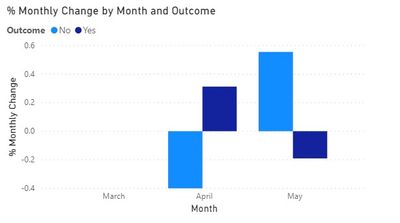
Hope it helps.
Cheers,
Marco
- Mark as New
- Bookmark
- Subscribe
- Mute
- Subscribe to RSS Feed
- Permalink
- Report Inappropriate Content
Hi @Anonymous ,
check this out:
https://drive.google.com/file/d/1WD35GYlk-SWcSC-JRz8Gywbiyg1U_-Op/view?usp=sharing
Cheers,
Marco


- Mark as New
- Bookmark
- Subscribe
- Mute
- Subscribe to RSS Feed
- Permalink
- Report Inappropriate Content
@Anonymous , you can use time intelligence to get current and last month and then take diff of that
MTD Sales = CALCULATE(SUM(Sales[Sales Amount]),DATESMTD(Table[Date]))
last MTD Sales = CALCULATE(SUM(Sales[Sales Amount]),DATESMTD(dateadd(Table[Date],-1,MONTH)))
last MTD (complete) Sales =  CALCULATE(SUM(Sales[Sales Amount]),DATESMTD(ENDOFMONTH(dateadd(Table[Date],-1,MONTH))))
last year MTD Sales = CALCULATE(SUM(Sales[Sales Amount]),DATESMTD(dateadd(Table[Date],-12,MONTH)))
last year MTD (complete) Sales =  CALCULATE(SUM(Sales[Sales Amount]),DATESMTD(ENDOFMONTH(dateadd(Table[Date],-12,MONTH))))
Month behind Sales = CALCULATE(SUM(Sales[Sales Amount]),dateadd(Table[Date],-1,Month))
last QTR same Month (complete) Sales =  CALCULATE(SUM(Sales[Sales Amount]),DATESMTD(ENDOFMONTH(dateadd(Table[Date],-1,Qtr))))
MTD (Year End) Sales =  CALCULATE(SUM(Sales[Sales Amount]),DATESMTD(ENDOFYEAR(Table[Date])))
MTD (Last Year End) Sales =  CALCULATE(SUM(Sales[Sales Amount]),DATESMTD(ENDOFYEAR(dateadd(Table[Date],-12,MONTH),"8/31")))
- Mark as New
- Bookmark
- Subscribe
- Mute
- Subscribe to RSS Feed
- Permalink
- Report Inappropriate Content
Hi @Anonymous ,
assuming you have a Date table you can try these measures:
Total Outcome = CALCULATE(
    COUNTA(Sheet1[Outcome]))
Total Outcome Prev Month = CALCULATE(
[Total Outcome],DATEADD('Date'[Date],-1,MONTH))% Monthly Change = DIVIDE(
[Total Outcome] - [Total Outcome Prev Month],[Total Outcome Prev Month], 0)
Hope it helps.
Cheers,
Marco
- Mark as New
- Bookmark
- Subscribe
- Mute
- Subscribe to RSS Feed
- Permalink
- Report Inappropriate Content
Hi @MarcoPessina ,
that table is exactly what I'd like, but after trying the measures it wasnt giving me right figures. I created a new small table to test it on too, as below,
| Reference | Date | Value |
| a | 01/03/2020 | Yes |
| b | 01/03/2020 | No |
| c | 01/03/2020 | No |
| d | 01/03/2020 | Yes |
| e | 01/03/2020 | No |
| a | 01/04/2020 | Yes |
| b | 01/04/2020 | No |
| c | 01/04/2020 | Yes |
| d | 01/04/2020 | No |
| e | 01/04/2020 | Yes |
| f | 01/04/2020 | No |
Getting this result though??
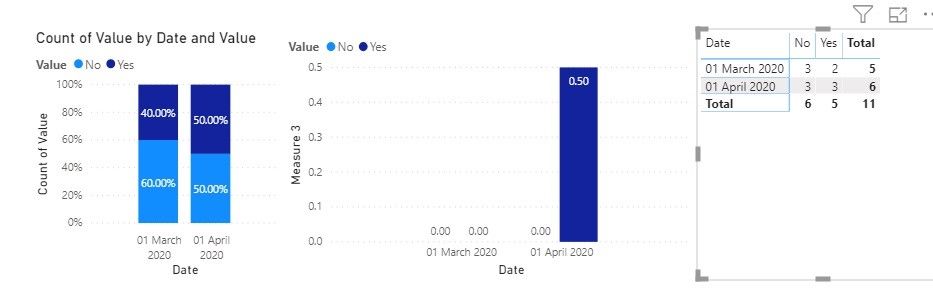
Not sure what I'm missing? Many thanks for your help!
- Mark as New
- Bookmark
- Subscribe
- Mute
- Subscribe to RSS Feed
- Permalink
- Report Inappropriate Content
Hi @Anonymous ,
check this out:
https://drive.google.com/file/d/1WD35GYlk-SWcSC-JRz8Gywbiyg1U_-Op/view?usp=sharing
Cheers,
Marco
Helpful resources

Data Days 2026
Don't miss out on Data Days, June 15 through August 7. Learn Fabric, Power BI, SQL, AI and more.

Power BI DataViz World Championships - June 2026
A new Power BI DataViz World Championship is coming this June! Don't miss out on submitting your entry.

| User | Count |
|---|---|
| 22 | |
| 20 | |
| 19 | |
| 19 | |
| 11 |


| User | Count |
|---|---|
| 61 | |
| 54 | |
| 46 | |
| 44 | |
| 34 |


