Join us at FabCon Atlanta from March 16 - 20, 2026, for the ultimate Fabric, Power BI, AI and SQL community-led event. Save $200 with code FABCOMM.
Register now!The Power BI Data Visualization World Championships is back! Get ahead of the game and start preparing now! Learn more
Hi there
I am having trouble getting the results I need. I have been asked to calculate the average per month of contract values. This would be easy in a data warehouse, but but I am having trouble when it comes to live data. I have seen monthly average examples that have helped somewhat but the focus is on sales. When it comes to contracts I need to work out what has come in for the month, what is still in and what has gone out that month, in terms of $ and count. Not the same as avg WIP per month on projects as $ amounts dont change on client contracts.
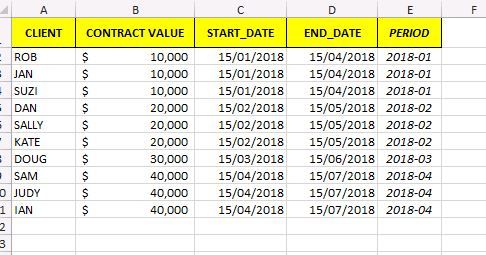
The data I am working with looks similar to this.... Where the avg is $10k for jan, $15k for feb, $30k for Apr, etc Any recommendations from those who worked with contracts in PBI would be much appreciated.
Hi @smathers,
Could you please mark the proper answers as solutions?
Best Regards,
Dale
Hi,
Please share the exact result that you are expecting.
Hi Ashish, I mentioned the average figures in my post in relation to the dummy data I had displayed. Avg = $10k for 2018-01, $15k for 2018-02, $30k for 2018-04.
So for instance using the data on the screen-shot for Period 2018-04 (actually it is not ideal example as I wanted to show that the contracts taken out in Januray were no longer active)
The average value of active contracts = the 3 in Feb + 1 in March + 3 April / (3+1+3)
or another way of looking at it (value of all contracts = $240k) - (value of expired contract = $30k) / (count of contacts (10)-count of expired contracts (3).
Its easy to write it as above but trickier to do so its dynamically calculated for each month. I figure I am going to have to use the EARLIER function to be able to sum or count at a monthly level.
I initially tried to do it all in one calculation, but I worked it out in the end by splitting up each component into its own variable (though I need to confirm the figures but they look good)
Sum of Contracts Started for the month + existing (ie sum_total_in as shown below)
Sum of Contracts Ended for the month + prior
Count of contracts started up the month
Count of contracts ended up the month
Period Start was a calculated field that gave me the last day of the month.
VAR sum_total_in =
CALCULATE(
SUM('Service Agreements History'[Coy Allocation]),
FILTER(
'Service Agreements History',
'Service Agreements History'[Contract Start Date] <= EARLIER('Service Agreements History'[Period Start])
Hi @smathers,
Please check out the demo in the attachment.
1. Create a measure.
Measure =
CALCULATE (
AVERAGE ( Table1[CONTRACT VALUE] ),
FILTER (
ALL ( Table1 ),
'Table1'[END_DATE] > MIN ( 'Table1'[START_DATE] )
&& 'Table1'[START_DATE] <= MIN ( 'Table1'[START_DATE] )
)
)
Best Regards,
Dale
The Power BI Data Visualization World Championships is back! Get ahead of the game and start preparing now!
| User | Count |
|---|---|
| 39 | |
| 38 | |
| 38 | |
| 28 | |
| 27 |
| User | Count |
|---|---|
| 124 | |
| 89 | |
| 73 | |
| 66 | |
| 65 |