Join us at FabCon Atlanta from March 16 - 20, 2026, for the ultimate Fabric, Power BI, AI and SQL community-led event. Save $200 with code FABCOMM.
Register now!The Power BI Data Visualization World Championships is back! Get ahead of the game and start preparing now! Learn more
Dear Power Bi Gurus,
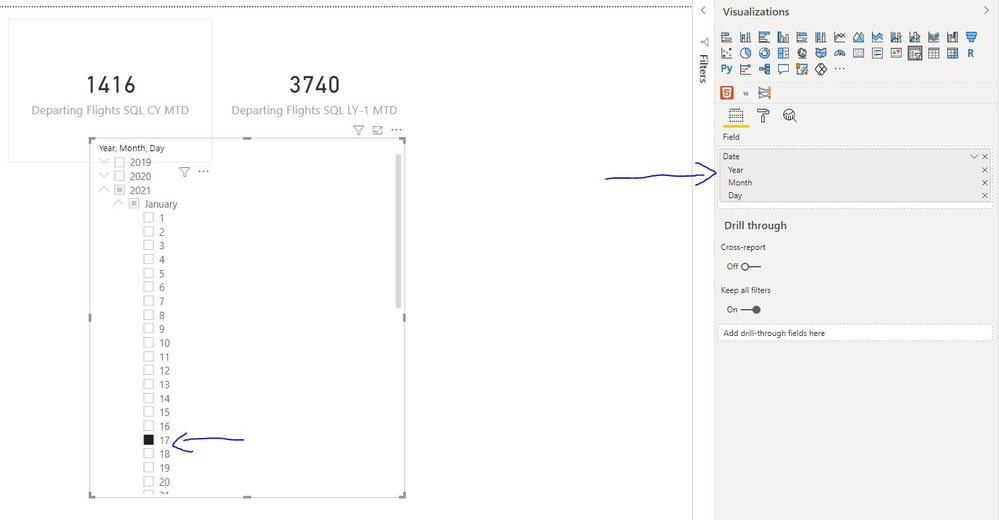
I have set up my model to count Month To Date values for this Year and Last Year as shown at the picture.
This is possible by manually selecting on a "Date Hierarchy" slicer. My results are correct this way.
However, as this will be a daily automated report, I would like to always have Yesterday Date as my most recent date on my Month to Date calculations.
This way my report will always reflect the "Start of Month - Yesterday" time period.
Could you please help me on how to automatically have yesterday as my last date?
Thank you in advance.
Solved! Go to Solution.
Dear @airportGR ,
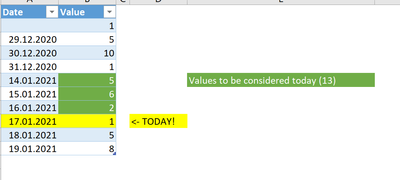
I enriched the sample data as follows.
The following formula should do it for the last year.
if you want to have it for two years ago please change the "YEAR(TODAY())-1" to "YEAR(TODAY())-2".
Did I solve your requests? Please mark my post as solution.
Appreciate your Kudos.
Best regards
Mikelytics
Dear @Mikelytics
Solution 1 works perfectly fine without any selection needed on the slicer
Solution 2 in order to work the slicer has to be selected (specific date ie 16/1/2021)
I am moving forward with Solution 1 (many thanks!)
Could you please advise on how to have the same MTD results for -1 and -2 years back (following Solution 1)
Thank you very much
Dear @airportGR ,
I enriched the sample data as follows.
The following formula should do it for the last year.
if you want to have it for two years ago please change the "YEAR(TODAY())-1" to "YEAR(TODAY())-2".
Did I solve your requests? Please mark my post as solution.
Appreciate your Kudos.
Best regards
Mikelytics
Dear @Mikelytics following your Solution 1 and adding the extra code for Last Year (-1) and (-2) solved my problem.
Thank you very much, I hope that this thread will help others too.
Hi @airportGR ,
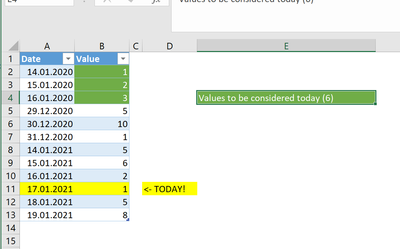
did you try to solve this by putting the filter in the measure? I have two possible solutions based on the following sample data.
(in Power BI I deleted the first row from the sample data)
Solution 1: if you want to use it in a KPI visual
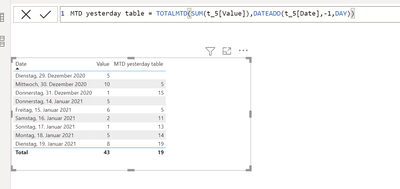
Solution 2: if you want to use it in a table or similar:
Hope this helps.
Best regards
Mikelytics
--------------------------------------------------------------------------------------------------------------------------
Did I solve your requests? Please mark my post as solution.
Appreciate your Kudos.
The Power BI Data Visualization World Championships is back! Get ahead of the game and start preparing now!
Check out the November 2025 Power BI update to learn about new features.
| User | Count |
|---|---|
| 59 | |
| 43 | |
| 42 | |
| 23 | |
| 17 |
| User | Count |
|---|---|
| 190 | |
| 122 | |
| 96 | |
| 66 | |
| 47 |