Don't miss your chance to take the Fabric Data Engineer (DP-600) exam for FREE! Find out how by attending the DP-600 session on April 23rd (pacific time), live or on-demand.
Learn moreNext up in the FabCon + SQLCon recap series: The roadmap for Microsoft SQL and Maximizing Developer experiences in Fabric. All sessions are available on-demand after the live show. Register now
Hi,
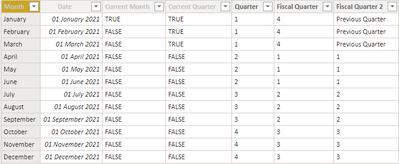
I have included a picture of the table below that I'm working with. Essentialy what I want is a Column that says "TRUE" when it is the previous month dynamically and "FALSE" when it isnt. I can do this through Power Query M, but. for my specific case when the month is January as it is now I want the previous month to be "TRUE" for December. Ignore the date column itself as that doesnt actually matter in this case.Would anyone know how to achieve this dynmaically through DAX?
Solved! Go to Solution.
Hi, @Anonymous
According to your description,I think you can create a measure or column to calculate the desired result.
Like this:
Column = var month1=MONTH(EDATE(TODAY(),-1))
var month2=MONTH('Table'[date])
return IF(month1=month2,"True","False")Measure = var month1=MONTH(EDATE(TODAY(),-1))
var month2=MONTH(SELECTEDVALUE('Table'[date]))
return IF(month1=month2,"True","False")If it doesn’t solve your problem, please feel free to ask me.
Best Regards
Janey Guo
If this post helps, then please consider Accept it as the solution to help the other members find it more quickly.
Hi, @Anonymous
According to your description,I think you can create a measure or column to calculate the desired result.
Like this:
Column = var month1=MONTH(EDATE(TODAY(),-1))
var month2=MONTH('Table'[date])
return IF(month1=month2,"True","False")Measure = var month1=MONTH(EDATE(TODAY(),-1))
var month2=MONTH(SELECTEDVALUE('Table'[date]))
return IF(month1=month2,"True","False")If it doesn’t solve your problem, please feel free to ask me.
Best Regards
Janey Guo
If this post helps, then please consider Accept it as the solution to help the other members find it more quickly.
Here is one way to do it.
To learn more about Power BI, follow me on Twitter or subscribe on YouTube.
HI Pat,
Ive tried this and unfortunately it didnt work, it kept coming up with "BLANK" when i included the =-1 and when i excluded it wasnt of much use unfortunately. have any other ideas or able to help?
Thanks
If you have recently started exploring Fabric, we'd love to hear how it's going. Your feedback can help with product improvements.
A new Power BI DataViz World Championship is coming this June! Don't miss out on submitting your entry.
Experience the highlights from FabCon & SQLCon, available live and on-demand starting April 14th.
| User | Count |
|---|---|
| 47 | |
| 43 | |
| 40 | |
| 20 | |
| 15 |
| User | Count |
|---|---|
| 70 | |
| 67 | |
| 32 | |
| 27 | |
| 25 |