cancel
Showing results for 
Search instead for 
Did you mean: 

We've captured the moments from FabCon & SQLCon that everyone is talking about, and we are bringing them to the community, live and on-demand. Starts on April 14th. Register now

Reply
GemcoDesigns
New Member

Month Sorting

I have create one report( Purchase Monthwise..


But the months are not sorting...


and it lokks like as per the image.Untitled.jpg


Can any one help me to overcome this:)..

4 REPLIES 4
amitchandak
Super User
Super User

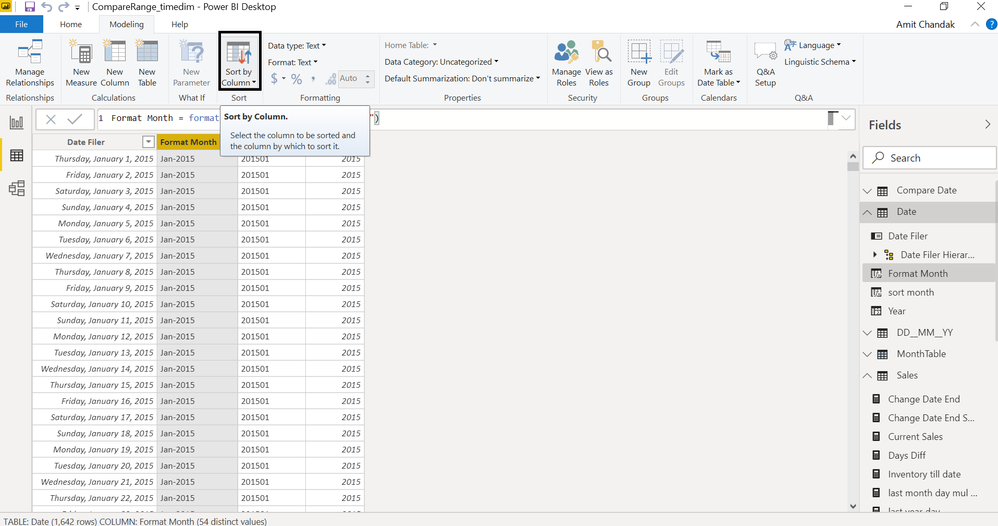
For the month and month year sorting; create sort column and mark them sort column


month year = format(date[date],"MMM-YYYY")

month year sort = format(date[date],"YYYYMM")


month= format(date[date],"MMMM")

month sort = format(date[date],"MM")

Sort_by_column.png


Appreciate your Kudos. In case, this is the solution you are looking for, mark it as the Solution. In case it does not help, please provide additional information and mark me with @
Thanks. My Recent Blog -
Winner-Topper-on-Map-How-to-Color-States-on-a-Map-with-Winners , HR-Analytics-Active-Employee-Hire-and-Termination-trend
Power-BI-Working-with-Non-Standard-Time-Periods And Comparing-Data-Across-Date-Ranges

Connect on Linkedin


Share with Power BI Enthusiasts: Full Power BI Video (20 Hours) YouTube
Microsoft Fabric Series 60+ Videos YouTube
Microsoft Fabric Hindi End to End YouTube
Anonymous
Not applicable

This is how I had to fix my visual with a similar issue. It wouldn't let me sort using my Date values for whatever reason so I wrote this and sorted that by my Date columns


Month Order =
var num = MONTH('TableName'[DateColumn])
return
IF(num = 1, "January",
IF(num = 2, "February",
IF(num = 3, "March",
IF(num = 4, "April",
IF(num = 5, "May",
IF(num = 6, "June",
IF(num = 7, "July",
IF(num = 8, "August",
IF(num = 9, "September",
IF(num = 10, "October",
IF(num = 11, "November",
IF(num = 12, "December"
))))))))))))
MartynRamsden
Solution Sage
Solution Sage

Hi @GemcoDesigns 


Your visualisation looks like it's sorted by Purchase Amount descending.

Click the ellipsis (...) in the top right hand corner of the chart and select Sort by>>Month.


When you do this, you may find that your months are sorted alphabetically rather than chronologically.
If so, you need to add a 'Month Sort' column to your model as detailed here: docs.microsoft.com/en-gb/archive/blogs/samlester/sorting-by-month-names-in-power-bi 


Best regards,
Martyn


If I answered your question, please help others by accepting it as a solution.

FrankAT
Community Champion
Community Champion

Hi,
select the visualization and click the three points in the upper right corner. Choose how to sort.


Regards Frank AT

Helpful resources

Announcements
New to Fabric survey Carousel

New to Fabric Survey

If you have recently started exploring Fabric, we'd love to hear how it's going. Your feedback can help with product improvements.

Power BI DataViz World Championships carousel

Power BI DataViz World Championships - June 2026

A new Power BI DataViz World Championship is coming this June! Don't miss out on submitting your entry.

Join our Fabric User Panel

Join our Fabric User Panel

Share feedback directly with Fabric product managers, participate in targeted research studies and influence the Fabric roadmap.

March Power BI Update Carousel

Power BI Community Update - March 2026

Check out the March 2026 Power BI update to learn about new features.