
We've captured the moments from FabCon & SQLCon that everyone is talking about, and we are bringing them to the community, live and on-demand. Starts on April 14th. Register now
Hi , i have a requirement to complete in Power Query.
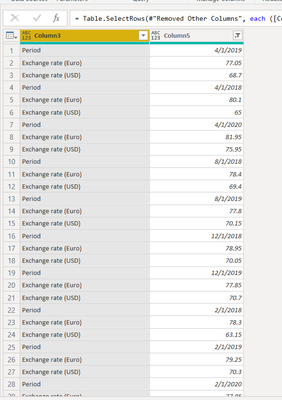
Given scenario is this ,
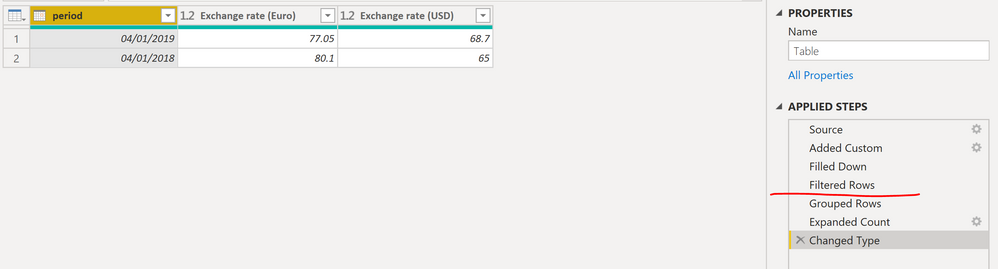
Output Required is this :
Period | Exchange rate(euro) | Exchange rate(usd) |
4/1/2019 77.05 68.7
and the other values are continued below. Period , exchange rates should be the column headers.
Is this possible in Power Query? I can't use DAX as i still need to model the data further , any help would be appreciated.
Solved! Go to Solution.
@Anonymous ,
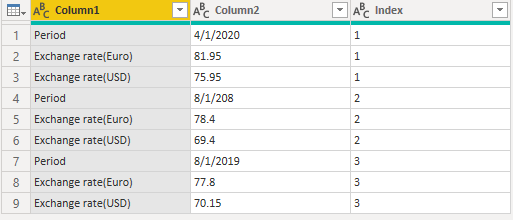
If you can add an index column like below, then you can use python script to meet your requirement.
# 'dataset' holds the input data for this script
import pandas as pd
dataset = dataset.pivot(index = 'Index', columns = 'Column1', values = 'Column2')
Community Support Team _ Jimmy Tao
If this post helps, then please consider Accept it as the solution to help the other members find it more quickly.
Hi @Anonymous
On the attached, you will find a solution using Power Query, if you have an extra ID column that could be used to group these 3 records together then skip prior steps and jump straight to Grouped Rows step.
@Anonymous ,
If you can add an index column like below, then you can use python script to meet your requirement.
# 'dataset' holds the input data for this script
import pandas as pd
dataset = dataset.pivot(index = 'Index', columns = 'Column1', values = 'Column2')
Community Support Team _ Jimmy Tao
If this post helps, then please consider Accept it as the solution to help the other members find it more quickly.
Hi @Anonymous
On the attached, you will find a solution using Power Query, if you have an extra ID column that could be used to group these 3 records together then skip prior steps and jump straight to Grouped Rows step.
If you have recently started exploring Fabric, we'd love to hear how it's going. Your feedback can help with product improvements.
A new Power BI DataViz World Championship is coming this June! Don't miss out on submitting your entry.
Share feedback directly with Fabric product managers, participate in targeted research studies and influence the Fabric roadmap.
| User | Count |
|---|---|
| 53 | |
| 38 | |
| 33 | |
| 17 | |
| 17 |
| User | Count |
|---|---|
| 67 | |
| 63 | |
| 38 | |
| 34 | |
| 22 |