

Don't miss your chance to take the Fabric Data Engineer (DP-600) exam for FREE! Find out how by attending the DP-600 session on April 23rd (pacific time), live or on-demand.
Learn moreNext up in the FabCon + SQLCon recap series: The roadmap for Microsoft SQL and Maximizing Developer experiences in Fabric. All sessions are available on-demand after the live show. Register now
Hello,
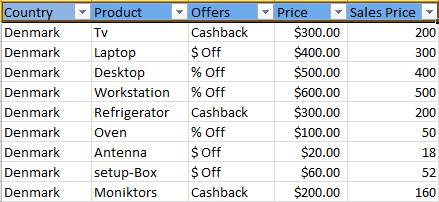
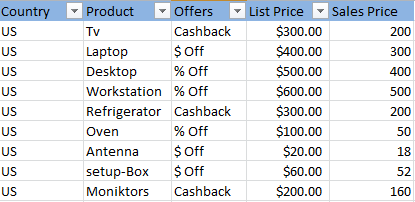
I have 3 excel workbook with data for different countries.so i wanted to use those excel file to create single dashboard so how should i do that?.i have attached sample data snapshots also for deeper understanding....
thanks in advance.
Solved! Go to Solution.
@Anonymous
In this scenario, since all you three tables have similar columns and structure, you just need to import those 3 workbooks into 3 datasets, then use "append query" in Query Editor to UNION the 3 datasets into 1 dataset.
Regards,
@Anonymous
In this scenario, since all you three tables have similar columns and structure, you just need to import those 3 workbooks into 3 datasets, then use "append query" in Query Editor to UNION the 3 datasets into 1 dataset.
Regards,
Hi dude ,
I think the excel format is same structure , am i right ?
if yes, Put all the excel in single path under separate folder .
and follow these steps in order .
1. Click the Query Editor
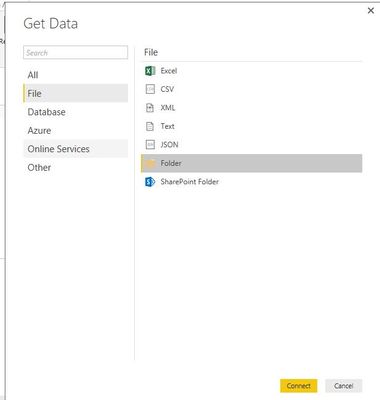
2.There Get Data
1. Get Data from Folder
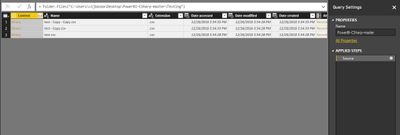
Once loaded into Query Editor
Remove other columns
Extract the table
let me know if any help
If you have recently started exploring Fabric, we'd love to hear how it's going. Your feedback can help with product improvements.
A new Power BI DataViz World Championship is coming this June! Don't miss out on submitting your entry.
| User | Count |
|---|---|
| 45 | |
| 43 | |
| 39 | |
| 19 | |
| 15 |
| User | Count |
|---|---|
| 67 | |
| 66 | |
| 31 | |
| 28 | |
| 24 |