Join us at FabCon Atlanta from March 16 - 20, 2026, for the ultimate Fabric, Power BI, AI and SQL community-led event. Save $200 with code FABCOMM.
Register now!The Power BI Data Visualization World Championships is back! Get ahead of the game and start preparing now! Learn more
Hi,
Another major Challenge, I have a requirement to calculate the YTD for certain business unit which has 2 below sub section and I need to select YTD for the BU and its sub section. For example I have this table as Input
Organization Unit Month Count
ABC SSS YYY JAN 2
ABC BBB ZZZ JAN 3
ABC SSS YYY FEB 2
ABC KKK WWW JAN 2
ABC SSS UUU JAN 1
So in here ABC is the organization UNIT and SSS, BBB, KKK is the first sub level and YYY,ZZZ,WWW, UUU is the second Sub level.
So when user select ABC in the slicer, he will get the YTD value as
Month Count YTD
JAN 8 8
FEB 2 10
and when he select ABC in the slicer and in second Slicer he select SSS then he get YTD as below
MONTH Count YTD
JAN 3 3
FEB 2 5
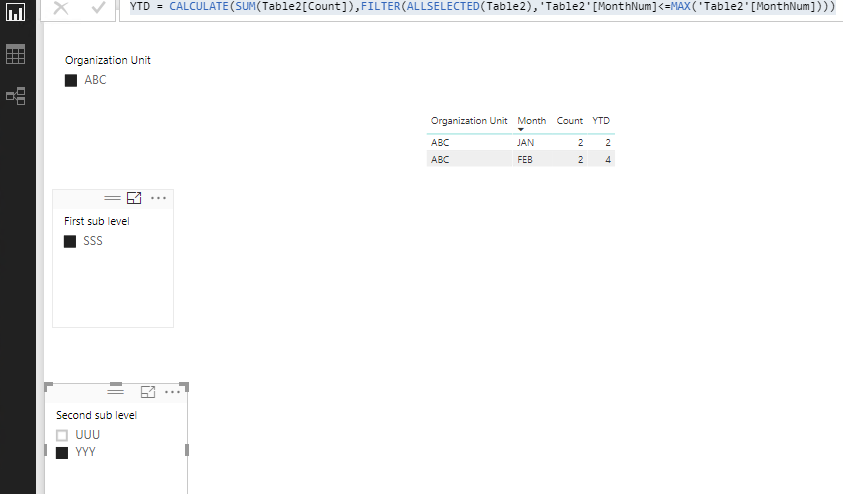
and when I select in 3rd slicer YYY
MONTH COUNT YTD
JAN 2 2
FEB 2 4
so this is how it will work, Hope i am clear with my example and would request the experts to join in with me and guide me through this task. The fist level i know can be done but how to do it for 2nd and 3rd level as there will be so many organization unit :?
hoping for a quick guidance.
Best Regards,
Ankku
Solved! Go to Solution.
Hi @Anonymous,
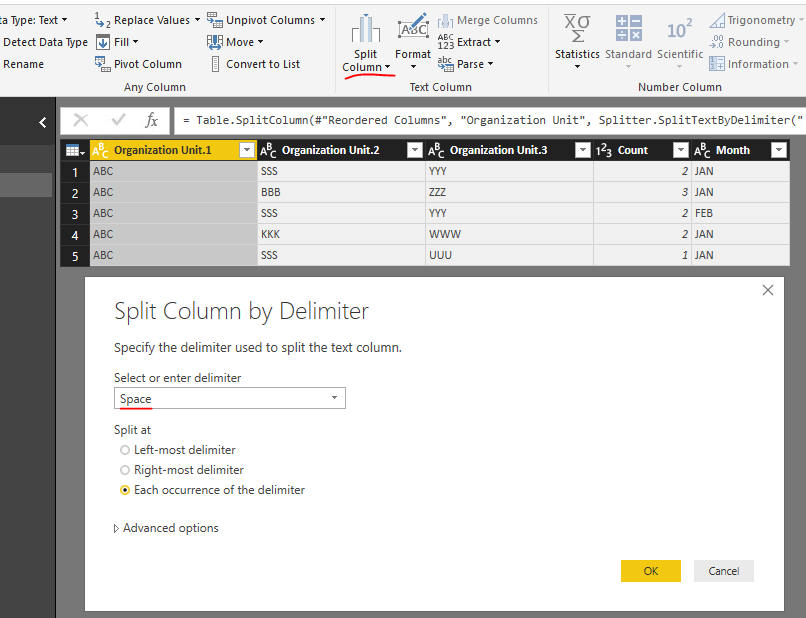
You can use Split Column feature in Query Editor to get three columns from Organization Unit:
Then create a calculated column to return month number:
MonthNum = SWITCH(TRUE(),'Table2'[Month]="JAN",1,'Table2'[Month]="FEB",2)
Then create a measure:
YTD = CALCULATE(SUM(Table2[Count]),FILTER(ALLSELECTED(Table2),'Table2'[MonthNum]<=MAX('Table2'[MonthNum])))
Best Regards,
Qiuyun Yu
Hi @Anonymous,
You can use Split Column feature in Query Editor to get three columns from Organization Unit:
Then create a calculated column to return month number:
MonthNum = SWITCH(TRUE(),'Table2'[Month]="JAN",1,'Table2'[Month]="FEB",2)
Then create a measure:
YTD = CALCULATE(SUM(Table2[Count]),FILTER(ALLSELECTED(Table2),'Table2'[MonthNum]<=MAX('Table2'[MonthNum])))
Best Regards,
Qiuyun Yu
Hi @v-qiuyu-msft,
Thanks this work, But I have months for various year, so how to classify that like I get values based on year. Right now with this formulae, It adds the data for Jan month for 2017 and 2018 both. I need to keep the year wise value seperate and calculate YTD for different year.
Please help me on that.
Thanks,
ankku
Hi @Anonymous,
This should be a different requirement from the original post. I would suggest you post a new thread in Desktop forum. Our community support team members will help you. ![]()
Best Regards,
Qiuyun Yu
The Power BI Data Visualization World Championships is back! Get ahead of the game and start preparing now!
| User | Count |
|---|---|
| 41 | |
| 37 | |
| 35 | |
| 35 | |
| 28 |
| User | Count |
|---|---|
| 134 | |
| 101 | |
| 71 | |
| 67 | |
| 65 |