cancel
Showing results for 
Search instead for 
Did you mean: 

Get Fabric Certified for FREE during Fabric Data Days. Don't miss your chance! Request now

Reply
marisarita93
Regular Visitor

Count data

Hi everyone, 

I'm new to power BI. I have a question how to count rows that have condition. 

For example I have a table with:

Status: Yes (Y), N (No), No Specified


First Name        Stage 1        Stage 2      Stage 3        Stage 4       Stage 5    Stage 6

abcs                    Y                   Y                    Y                 N              N             N

def                        n        No specified             Y              Y                 Y             Y

yui                         Y                 N                  N           No Specified      N          Y

sdewe          No Specified        Y                     N                  Y                  N        Y

I want to calculate each stage that has total number of Y and total number of N. 

Is there any ways that combine all stages to visualize in one graph? Looks like this picture 


See the source image
1 ACCEPTED SOLUTION
Barnee
Advocate IV
Advocate IV

Hi @marisarita93,


If you have quite the same original table as your sample one (and if I understood your problem) I would suggest to do the following:

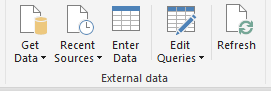
1.) Go to the Query Editor (Home - Edit Queries) - a new window will pop-up
eq.PNG


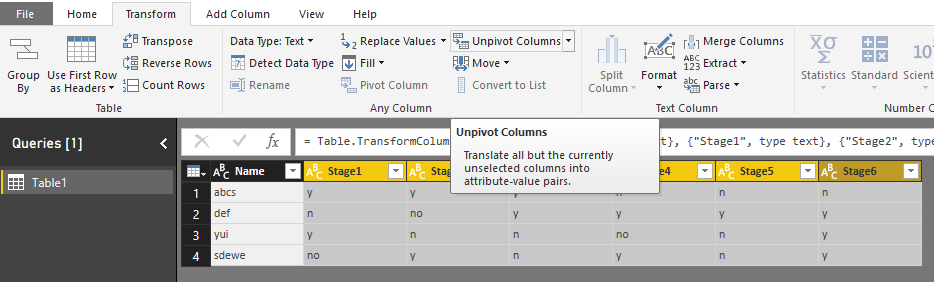
2) Select all the stages in your table and click the Unpivot columns option.

unpivot.PNG

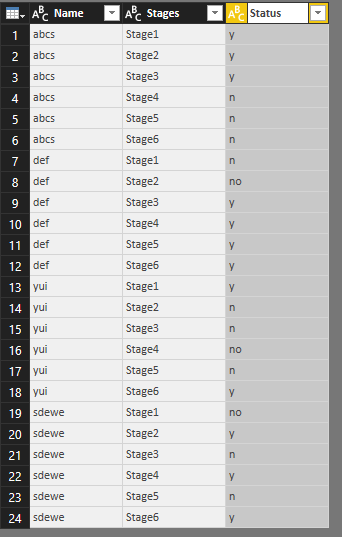
3) In the next step you can rename your columns as Stages and Status, then hit Home - Close and apply. 


stages.PNG


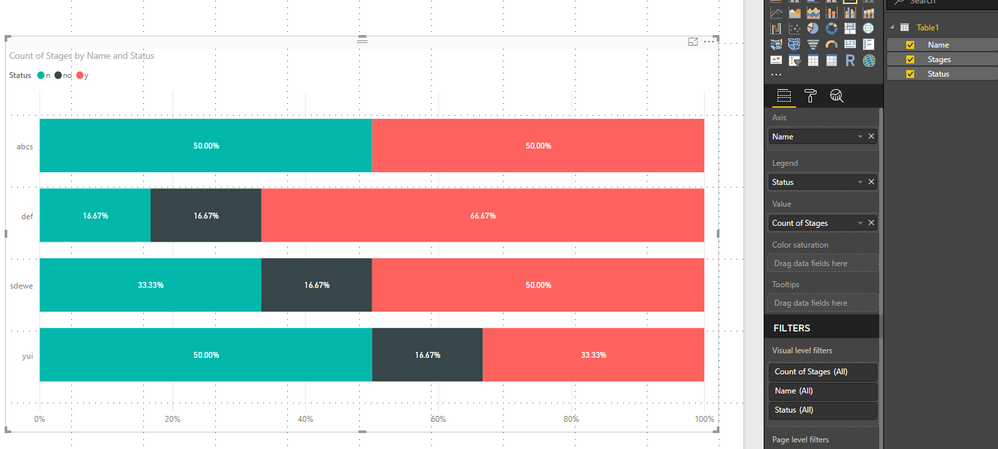
4) Now you can count the number of different statuses of the stages and create the visual:

visual.PNG


The Query Editor is a pretty useful tool to make transformations and prepear your datasources I suggest you to dive into it 🙂

I hope I could help!

Bests,

Barna

View solution in original post

1 REPLY 1
Barnee
Advocate IV
Advocate IV

Hi @marisarita93,


If you have quite the same original table as your sample one (and if I understood your problem) I would suggest to do the following:

1.) Go to the Query Editor (Home - Edit Queries) - a new window will pop-up
eq.PNG


2) Select all the stages in your table and click the Unpivot columns option.

unpivot.PNG

3) In the next step you can rename your columns as Stages and Status, then hit Home - Close and apply. 


stages.PNG


4) Now you can count the number of different statuses of the stages and create the visual:

visual.PNG


The Query Editor is a pretty useful tool to make transformations and prepear your datasources I suggest you to dive into it 🙂

I hope I could help!

Bests,

Barna

Helpful resources

Announcements
November Power BI Update Carousel

Power BI Monthly Update - November 2025

Check out the November 2025 Power BI update to learn about new features.

Fabric Data Days Carousel

Fabric Data Days

Advance your Data & AI career with 50 days of live learning, contests, hands-on challenges, study groups & certifications and more!

FabCon Atlanta 2026 carousel

FabCon Atlanta 2026

Join us at FabCon Atlanta, March 16-20, for the ultimate Fabric, Power BI, AI and SQL community-led event. Save $200 with code FABCOMM.

Top Solution Authors
Top Kudoed Authors