Get certified for free when you join Fabric Data Days 2026 and dive into Fabric, Power BI, SQL, AI, and other essential data skills.
Join nowJuly 28 - August 9 | Final Round of the Power BI Dataviz World Championships. This is your chance. Learn more
Hi
I have a query:
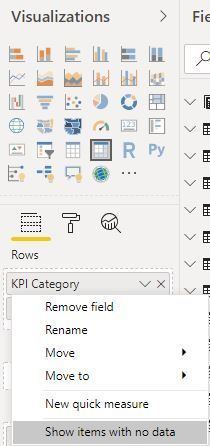
I have used a measure with divide function i am able to get value for that measure but when i want to see for country table dimension some of the rows are missing.
Eg:
Table1[Country]
India
austraila
USA
Germany
spain
Italy
Iran
UK
when i use that measure & country with table chart, some of the countries are missing and not able to report the value for remaining
output is coming like below
Table1[Country] Measure1
USA 8.08%
Germany 2.29%
spain 3.4%
Iran 3.1%
how to get the values for remaining countries ?
any suggestions?
Proud to be a Super User! | |
Hi @rajendraongole1 ,
Please create a new measure as below to work on it.
New= [Measure1]+0
Thank you amit.
Suppose if i use country name as filter, i am not getting the data for particular measure with card chart.
is there any way to report even the country value is blank or zero for that measure if i use card visual?
Proud to be a Super User! | |
Hi
Any possibility to get the data if i used for dimension and card visual?
i tried with isblank function and +0 also for the measure i have created. but not worked out.
Please suggest.
Proud to be a Super User! | |
If you love stickers, then you will definitely want to check out our community sticker challenge, Barcelona edition!
Check out the July 2026 Power BI update to learn about new features.
| User | Count |
|---|---|
| 30 | |
| 28 | |
| 23 | |
| 21 | |
| 19 |
| User | Count |
|---|---|
| 40 | |
| 31 | |
| 18 | |
| 18 | |
| 15 |