This time we’re going bigger than ever. Fabric, Power BI, SQL, AI and more. We're covering it all. You won't want to miss it.
Learn moreLevel up your Power BI skills this month - build one visual each week and tell better stories with data! Get started
When I query my Log Analytics workspace, the returned results are missing "windows" of data at various locations in the results table. Here is my kusto query in LA:
Event | where EventLog == "Talon" | search EventData contains ":Filename=TafsMtPt:" | parse RenderedDescription with "Result=" Result ":error=" Error ":Peer=" Peer ":Direction=" Direction ":Mode=" Mode ":Filename=TafsMtPt:" Filename ":File Size=" FileSize ":Bytes Exchanged=" BytesExchanged ":Transfer Efficiency=" TransferEfficiency ":SID=" UserSID | project Computer, Result, Error, Peer, Direction, Mode, Filename, FileSize, BytesExchanged, TransferEfficiency, UserSID, TimeGenerated, EventLevelName | project-rename EventTime = TimeGenerated, LogType = EventLevelName | where Filename !contains "-temp." and Filename !contains "desktop.ini" and Filename !contains "~$" and Filename !contains ".tmp" and Filename !endswith "_placeholder_"
When I run this query in the Azure portal, I get complete results, with no missing data. Visualizing the results in a Log Analytics workspace summary by counting the number of events in hourly bins, you see spikes in the number of events for each weekday.
But when I export the kusto query to M Query for Power BI, the resultant data set is missing a significant amount of data. Two of the weekday peaks are missing entirely.
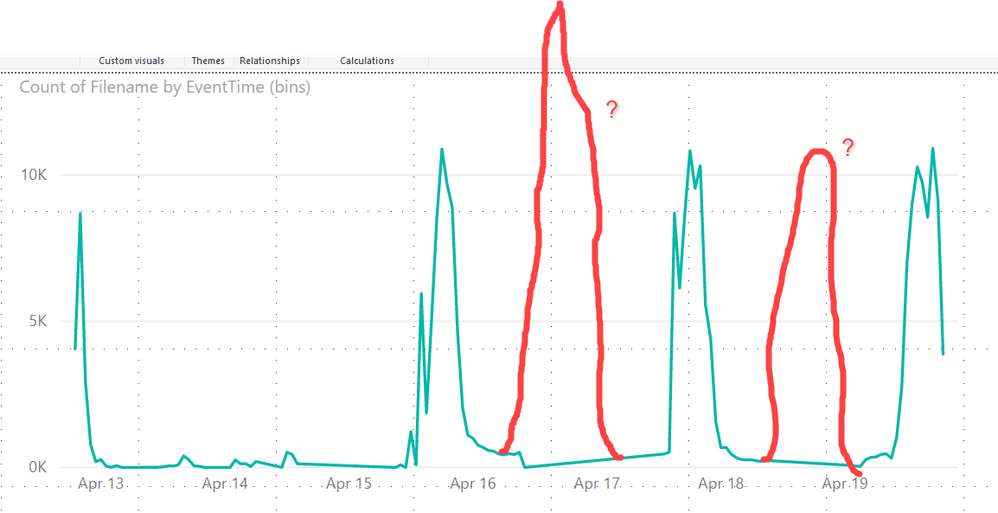
I am using the latest edition of Power BI desktop. What on earth is going on here?
Solved! Go to Solution.
I resolved this. My missing data was due to a results table that violated the 64,000,000 bytes maximum enforced by the Log Analytics API. I will have to re-architect my queries with this limitation in mind. The Log Analytics API limitations are documented here:
https://dev.loganalytics.io/documentation/Using-the-API/Limits
I resolved this. My missing data was due to a results table that violated the 64,000,000 bytes maximum enforced by the Log Analytics API. I will have to re-architect my queries with this limitation in mind. The Log Analytics API limitations are documented here:
https://dev.loganalytics.io/documentation/Using-the-API/Limits
Hi @jholl016 ,
Based on my test, I cannot reproduce your issue here. I recommend you to create a support ticket for help if you are a pro user.
https://powerbi.microsoft.com/en-us/support/
Check out the April 2026 Power BI update to learn about new features.
Sign up to receive a private message when registration opens and key events begin.
If you have recently started exploring Fabric, we'd love to hear how it's going. Your feedback can help with product improvements.
| User | Count |
|---|---|
| 36 | |
| 29 | |
| 29 | |
| 21 | |
| 18 |
| User | Count |
|---|---|
| 68 | |
| 39 | |
| 33 | |
| 24 | |
| 23 |