cancel
Showing results for 
Search instead for 
Did you mean: 

The Power BI Data Visualization World Championships is back! Get ahead of the game and start preparing now! Learn more

Reply
jholl016
New Member

Missing data when querying Log Analytics

When I query my Log Analytics workspace, the returned results are missing "windows" of data at various locations in the results table.  Here is my kusto query in LA:

Event 
| where EventLog == "Talon"
| search EventData contains ":Filename=TafsMtPt:"
| parse RenderedDescription with "Result=" Result ":error=" Error ":Peer=" Peer ":Direction=" Direction ":Mode=" Mode ":Filename=TafsMtPt:" Filename ":File Size=" FileSize ":Bytes Exchanged=" BytesExchanged ":Transfer Efficiency=" TransferEfficiency ":SID=" UserSID
| project Computer, Result, Error, Peer, Direction, Mode, Filename, FileSize, BytesExchanged, TransferEfficiency, UserSID, TimeGenerated, EventLevelName
| project-rename EventTime = TimeGenerated, LogType = EventLevelName
| where Filename !contains "-temp." and Filename !contains "desktop.ini" and Filename !contains "~$" and Filename !contains ".tmp" and Filename !endswith "_placeholder_"

When I run this query in the Azure portal, I get complete results, with no missing data.  Visualizing the results in a Log Analytics workspace summary by counting the number of events in hourly bins, you see spikes in the number of events for each weekday.

LA_WorkspaceSummary.png

But when I export the kusto query to M Query for Power BI, the resultant data set is missing a significant amount of data.  Two of the weekday peaks are missing entirely.
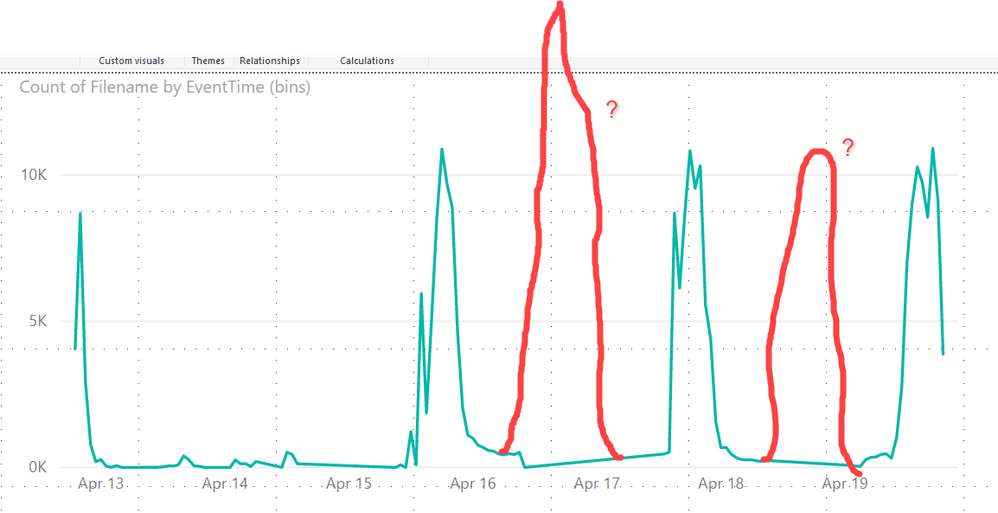
PowerBI_Results.png


I am using the latest edition of Power BI desktop.  What on earth is going on here?


1 ACCEPTED SOLUTION
jholl016
New Member

I resolved this. My missing data was due to a results table that violated the 64,000,000 bytes maximum enforced by the Log Analytics API.  I will have to re-architect my queries with this limitation in mind.  The Log Analytics API limitations are documented here:


https://dev.loganalytics.io/documentation/Using-the-API/Limits

View solution in original post

2 REPLIES 2
jholl016
New Member

I resolved this. My missing data was due to a results table that violated the 64,000,000 bytes maximum enforced by the Log Analytics API.  I will have to re-architect my queries with this limitation in mind.  The Log Analytics API limitations are documented here:


https://dev.loganalytics.io/documentation/Using-the-API/Limits

v-frfei-msft
Community Support
Community Support

Hi @jholl016 ,


Based on my test, I cannot reproduce your issue here. I recommend you to create a support ticket for help if you are a pro user.
 
https://powerbi.microsoft.com/en-us/support/

Support Ticket.gif


Community Support Team _ Frank
If this post helps, then please consider Accept it as the solution to help the others find it more quickly.

Helpful resources

Announcements
Power BI DataViz World Championships

Power BI Dataviz World Championships

The Power BI Data Visualization World Championships is back! Get ahead of the game and start preparing now!

December 2025 Power BI Update Carousel

Power BI Monthly Update - December 2025

Check out the December 2025 Power BI Holiday Recap!

FabCon Atlanta 2026 carousel

FabCon Atlanta 2026

Join us at FabCon Atlanta, March 16-20, for the ultimate Fabric, Power BI, AI and SQL community-led event. Save $200 with code FABCOMM.