Learn from the best! Meet the four finalists headed to the FINALS of the Power BI Dataviz World Championships! Register now
I was lead to believe that Python integartion should be available in the latest version but I can't find it?
The version is 2.61.5192.601 64-bit (August 2018) but there is no Python script - option in the Get Data - dialog nor can I see any option to create a Python visual on the Report - tab.
Solved! Go to Solution.
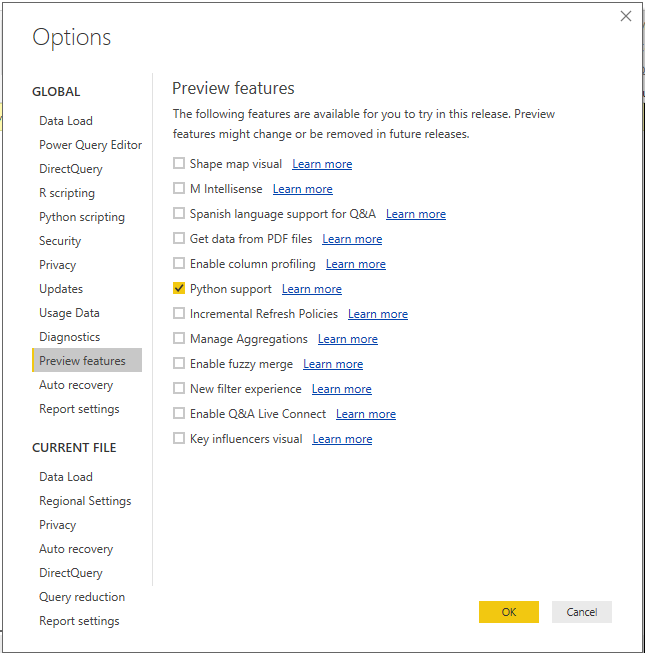
Make sure you have enabled the “Python Support” feature from the Power BI Desktop. To enable this feature, Go to File menu > Options and Settings > select Options > Preview Features > select “Python Support” > click OK.
Restart the Power BI App.
Hello,
there is no "Preview Features" in my Power BI Desktop.
@Anonymous
Can you find this after clicking on options
This window will open once you click on options
Hello,
I am using Power BI Desktop Optimized for Report Server. I guess I can not see for this reason, because there is really no any "Preview Features" 😕
Hello,
I also installed PBI August 2018 but there is not even "Preview Features", or Python Script.
| User | Count |
|---|---|
| 55 | |
| 37 | |
| 23 | |
| 17 | |
| 17 |
| User | Count |
|---|---|
| 69 | |
| 58 | |
| 39 | |
| 21 | |
| 21 |