This time we’re going bigger than ever. Fabric, Power BI, SQL, AI and more. We're covering it all. You won't want to miss it.
Learn moreJoin the FabCon + SQLCon recap series. Up next: Power BI, Real-Time Intelligence, IQ and AI, and Data Factory take center stage. All sessions are available on-demand after the live show. Register now
I was lead to believe that Python integartion should be available in the latest version but I can't find it?
The version is 2.61.5192.601 64-bit (August 2018) but there is no Python script - option in the Get Data - dialog nor can I see any option to create a Python visual on the Report - tab.
Solved! Go to Solution.
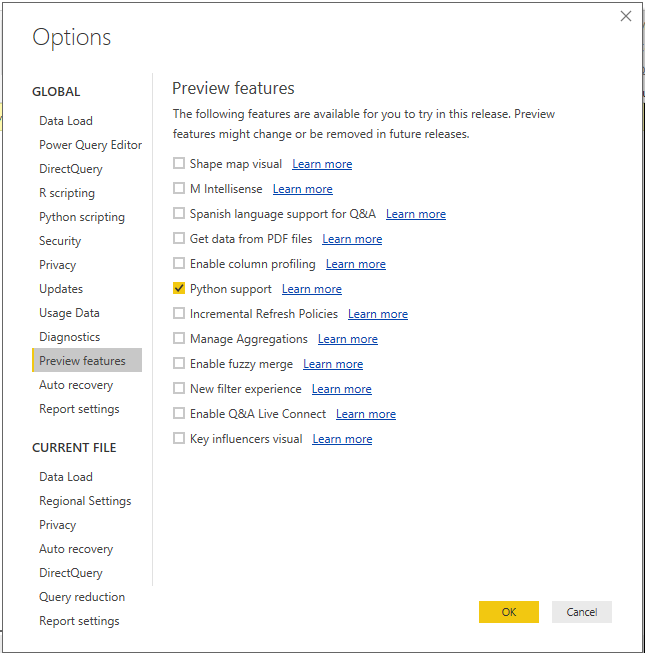
Make sure you have enabled the “Python Support” feature from the Power BI Desktop. To enable this feature, Go to File menu > Options and Settings > select Options > Preview Features > select “Python Support” > click OK.
Restart the Power BI App.
Hello,
there is no "Preview Features" in my Power BI Desktop.
@Anonymous
Can you find this after clicking on options
This window will open once you click on options
Hello,
I am using Power BI Desktop Optimized for Report Server. I guess I can not see for this reason, because there is really no any "Preview Features" 😕
Hello,
I also installed PBI August 2018 but there is not even "Preview Features", or Python Script.
Check out the April 2026 Power BI update to learn about new features.
If you have recently started exploring Fabric, we'd love to hear how it's going. Your feedback can help with product improvements.
A new Power BI DataViz World Championship is coming this June! Don't miss out on submitting your entry.
| User | Count |
|---|---|
| 38 | |
| 38 | |
| 31 | |
| 22 | |
| 15 |
| User | Count |
|---|---|
| 74 | |
| 61 | |
| 31 | |
| 31 | |
| 23 |