cancel
Showing results for 
Search instead for 
Did you mean: 

Learn from the best! Meet the four finalists headed to the FINALS of the Power BI Dataviz World Championships! Register now

Reply
audrieg
Frequent Visitor

Missing Measure Area

I remember an area on the bottom of the modeling table where I could see my measure and the resulting amount. Did that area get deprecated?


bottomleft.PNG


1 ACCEPTED SOLUTION

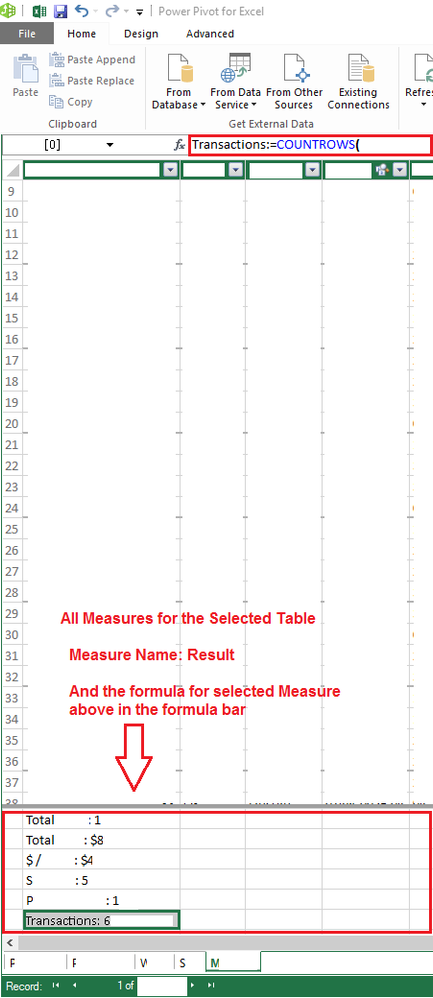
@audrieg That area never made it into PBI


2016-10-16 - PowerPivot Measures.png

View solution in original post

5 REPLIES 5
v-sihou-msft
Microsoft Employee
Microsoft Employee

@audrieg


In Power BI Desktop, all measures and calculated columns are appeared under dataset like a data field. The measure has a calculator icon.


Capture.PNG


Regards,

Didn't it used to show up on the bottom on the dataset?

@audrieg


All the fields (data fields, calculated column, measure) under dataset are always in alphabet order. 


Regards,

@audrieg That area never made it into PBI


2016-10-16 - PowerPivot Measures.png

Sean
Community Champion
Community Champion

This was only in PowerPivot - it never made it in the PBI Desktop!


If you want to get a List of Measures try DAX Studio - find out more here


Helpful resources

Announcements
Join our Fabric User Panel

Join our Fabric User Panel

Share feedback directly with Fabric product managers, participate in targeted research studies and influence the Fabric roadmap.

March Power BI Update Carousel

Power BI Community Update - March 2026

Check out the March 2026 Power BI update to learn about new features.