This time we’re going bigger than ever. Fabric, Power BI, SQL, AI and more. We're covering it all. You won't want to miss it.
Learn moreLevel up your Power BI skills this month - build one visual each week and tell better stories with data! Get started
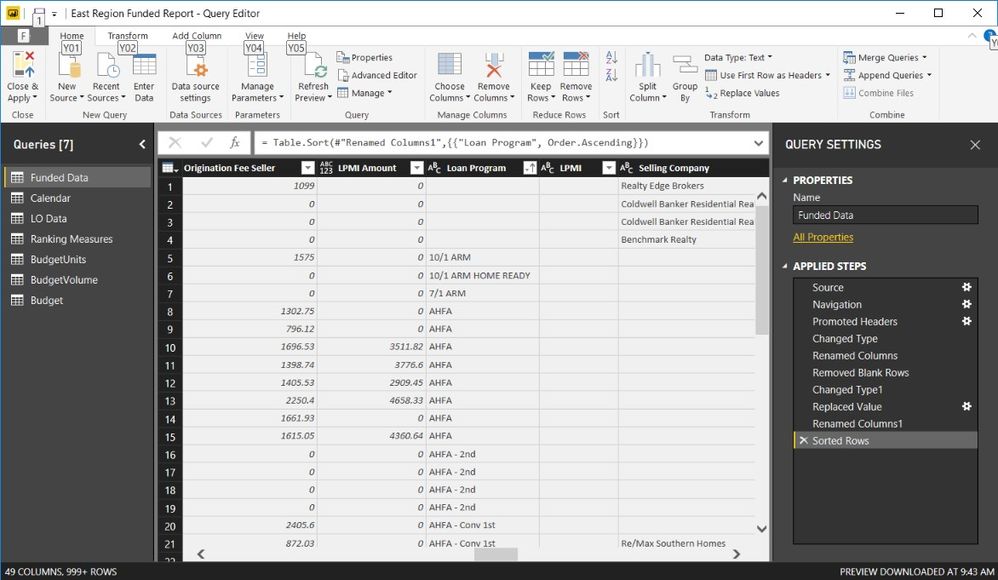
I have a dataset that has about 15,000 rows and 49 columns. In the image below, under "Loan Program" you can see I have 4 values missing. Two of them are the same value and the other 2 are different. I can't just "replace values" becasue they aren't all the same. Is there another way to add that data in the Query Editor inorder to not have to manually fix the exported spreadsheet before it is imported into Power BI Desktop?
Thanks!
Solved! Go to Solution.
Well, you could use an Enter Data query to just manually put in the values for all of the columns. Then you could filter those rows with blank values out of that query and then Append your Enter Data and that query together.
Are these missing values in any way conditional on values in any other column?
Check out the April 2026 Power BI update to learn about new features.
Sign up to receive a private message when registration opens and key events begin.
If you have recently started exploring Fabric, we'd love to hear how it's going. Your feedback can help with product improvements.
| User | Count |
|---|---|
| 35 | |
| 32 | |
| 26 | |
| 21 | |
| 18 |
| User | Count |
|---|---|
| 68 | |
| 37 | |
| 33 | |
| 23 | |
| 23 |