Join us in Barcelona for FabCon and SQLCon, September 28 - October 1, 2026.
This is best Fabric, Power BI, SQL and AI community event. How do we know? The last event sold out! Save €200 with code FABCMTY200.
Register now- Power BI forums
- Get Help with Power BI
- Desktop
- Service
- Report Server
- Power Query
- Mobile Apps
- Developer
- DAX Commands and Tips
- Custom Visuals Development Discussion
- Health and Life Sciences
- Power BI Spanish forums
- Translated Spanish Desktop
- Training and Consulting
- Instructor Led Training
- Dashboard in a Day for Women, by Women
- Galleries
- Data Stories Gallery
- Themes Gallery
- Contests Gallery
- QuickViz Gallery
- Quick Measures Gallery
- Visual Calculations Gallery
- Fabric Apps Gallery
- Notebook Gallery
- Translytical Task Flow Gallery
- TMDL Gallery
- R Script Showcase
- Webinars and Video Gallery
- Ideas
- Custom Visuals Ideas (read-only)
- Issues
- Issues
- Events
- Upcoming Events
July 28 - August 9 | Final Round of the Power BI Dataviz World Championships. This is your chance. Learn more
- Power BI forums
- Forums
- Get Help with Power BI
- Desktop
- Re: Minimum Difference between 2 dates
- Subscribe to RSS Feed
- Mark Topic as New
- Mark Topic as Read
- Float this Topic for Current User
- Bookmark
- Subscribe
- Printer Friendly Page


- Mark as New
- Bookmark
- Subscribe
- Mute
- Subscribe to RSS Feed
- Permalink
- Report Inappropriate Content
Minimum Difference between 2 dates
Hi all,
I have a table
| John | 20180412 |
| Dave | 20180131 |
| Emily | 20171226 |
| John | 20180205 |
| Emily | 20180314 |
| Dave | 20180405 |
| John | 20180218 |
| John | 20180125 |
| Dave | 20180401 |
| Emily | 20180222 |
to
| Name | Min Difference (days) |
| John | 11 |
| Dave | 4 |
| Emily | 20 |
I am trying to use SUMX and SUMMARIZE but to not avail.
Is there any other way to get this? Using Calculated Column or Measure better?
@Greg_Deckler, @MattAllington @Phil_Seamark @quentin_vigne
Solved! Go to Solution.

- Mark as New
- Bookmark
- Subscribe
- Mute
- Subscribe to RSS Feed
- Permalink
- Report Inappropriate Content
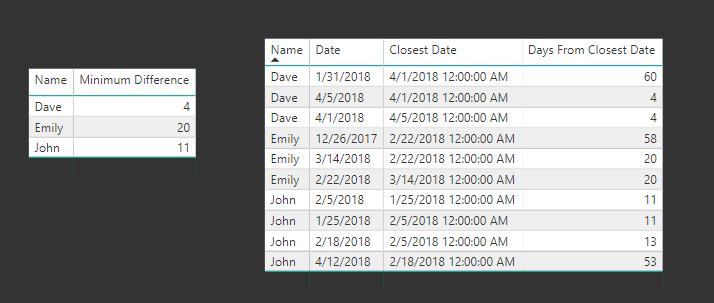
This was a fun one. Took me a while, and I'll bet my solution isn't the prettiest or most efficient, but it works.
For each date, to get the nearest date:
Closest Date =
VAR previous = CALCULATE(MAX(Data[Date]), FILTER(Data, [Date] < EARLIER(Data[Date]) && [Name] = EARLIER(Data[Name])))
VAR next = CALCULATE(MIN(Data[Date]), FILTER(Data, [Date] > EARLIER(Data[Date]) && [Name] = EARLIER(Data[Name])))
VAR daysFromPrevious = DATEDIFF(previous, Data[Date], DAY)
VAR daysFromNext = DATEDIFF(Data[Date], next, DAY)
return SWITCH(TRUE(),
    ISBLANK(next), previous,
    ISBLANK(previous), next,
    daysFromNext > daysFromPrevious, previous, next)
Only a few swaps to get the days between that date and the nearest date:
Days From Closest Date =
VAR previous = CALCULATE(MAX(Data[Date]), FILTER(Data, [Date] < EARLIER(Data[Date]) && [Name] = EARLIER(Data[Name])))
VAR next = CALCULATE(MIN(Data[Date]), FILTER(Data, [Date] > EARLIER(Data[Date]) && [Name] = EARLIER(Data[Name])))
VAR daysFromPrevious = DATEDIFF(previous, Data[Date], DAY)
VAR daysFromNext = DATEDIFF(Data[Date], next, DAY)
return SWITCH(TRUE(),
    ISBLANK(next), daysFromPrevious,
    ISBLANK(previous), daysFromNext,
    daysFromNext > daysFromPrevious, daysFromPrevious, daysFromNext)
All that's left is a simple MIN()-based measure:
Minimum Difference = MIN(Data[Days From Closest Date])
Using variables really helps to break this problem down into its simplest components.


- Mark as New
- Bookmark
- Subscribe
- Mute
- Subscribe to RSS Feed
- Permalink
- Report Inappropriate Content
Hi @ngadiez,
The solution is achieved by "Summarize".
Measure 2 =
MINX (
    SUMMARIZE (
        'Table2',
        Table2[Name],
        Table2[Date],
        "dates", DATEDIFF (
            [Date],
            CALCULATE (
                MIN ( 'Table2'[Date] ),
                FILTER (
                    ALLEXCEPT ( 'Table2', Table2[Name] ),
                    'Table2'[Date] > MIN ( 'Table2'[Date] )
                )
            ),
            DAY
        )
    ),
    [dates]
)
Best Regards,
Dale
If this post helps, then please consider Accept it as the solution to help the other members find it more quickly.


- Mark as New
- Bookmark
- Subscribe
- Mute
- Subscribe to RSS Feed
- Permalink
- Report Inappropriate Content
That's very good - we just need to compare each date with the next date!
You've inspired one last version from me (first time I've used NATURALINNERJOIN in a measure):
Min Difference (Days) v3 =
VAR DateList =
    VALUES ( Data[Date] )
VAR DateListIndexed =
    ADDCOLUMNS ( DateList, "Index", RANKX ( DateList, Data[Date],, ASC ) )
VAR DateListIndexedPlusOne =
    SELECTCOLUMNS ( DateListIndexed, "Date2", Data[Date], "Index", [Index] + 1 )
VAR Joined =
    NATURALINNERJOIN ( DateListIndexed, DateListIndexedPlusOne )
RETURN
    MINX ( Joined, ABS ( [Date] - [Date2] ) )
Regards,
Owen
- Mark as New
- Bookmark
- Subscribe
- Mute
- Subscribe to RSS Feed
- Permalink
- Report Inappropriate Content
Hi @ngadiez,
Could you please mark the proper answers as solutions?
Best Regards,
Dale
If this post helps, then please consider Accept it as the solution to help the other members find it more quickly.
- Mark as New
- Bookmark
- Subscribe
- Mute
- Subscribe to RSS Feed
- Permalink
- Report Inappropriate Content
Hi @ngadiez,
The solution is achieved by "Summarize".
Measure 2 =
MINX (
    SUMMARIZE (
        'Table2',
        Table2[Name],
        Table2[Date],
        "dates", DATEDIFF (
            [Date],
            CALCULATE (
                MIN ( 'Table2'[Date] ),
                FILTER (
                    ALLEXCEPT ( 'Table2', Table2[Name] ),
                    'Table2'[Date] > MIN ( 'Table2'[Date] )
                )
            ),
            DAY
        )
    ),
    [dates]
)
Best Regards,
Dale
If this post helps, then please consider Accept it as the solution to help the other members find it more quickly.
- Mark as New
- Bookmark
- Subscribe
- Mute
- Subscribe to RSS Feed
- Permalink
- Report Inappropriate Content
That's very good - we just need to compare each date with the next date!
You've inspired one last version from me (first time I've used NATURALINNERJOIN in a measure):
Min Difference (Days) v3 =
VAR DateList =
    VALUES ( Data[Date] )
VAR DateListIndexed =
    ADDCOLUMNS ( DateList, "Index", RANKX ( DateList, Data[Date],, ASC ) )
VAR DateListIndexedPlusOne =
    SELECTCOLUMNS ( DateListIndexed, "Date2", Data[Date], "Index", [Index] + 1 )
VAR Joined =
    NATURALINNERJOIN ( DateListIndexed, DateListIndexedPlusOne )
RETURN
    MINX ( Joined, ABS ( [Date] - [Date2] ) )
Regards,
Owen
- Mark as New
- Bookmark
- Subscribe
- Mute
- Subscribe to RSS Feed
- Permalink
- Report Inappropriate Content
Hi @ngadiez
Here's another version, just a measure:
Min Difference (days) =
VAR DateList =
    VALUES ( Data[Date] )
RETURN
    MINX (
        GENERATE (
            SELECTCOLUMNS ( DateList, "Date1", Data[Date] ),
            SELECTCOLUMNS ( EXCEPT ( DateList, { [Date1] } ), "Date2", Data[Date] )
        ),
        ABS ( [Date1] - [Date2] )
    )
EDIT: Possible improvement if we restrict Date2 > Date1:
Min Difference (days) v2 =
VAR DateList =
    VALUES ( Data[Date] )
RETURN
    MINX (
        GENERATE (
            SELECTCOLUMNS ( DateList, "Date1", Data[Date] ),
            SELECTCOLUMNS ( FILTER ( DateList, Data[Date] > [Date1] ), "Date2", Data[Date] )
        ),
        ABS ( [Date1] - [Date2] )
    )
Note these assume there are no repeated dates, so the difference is the minimum difference between distinct dates.
Regards,
Owen
- Mark as New
- Bookmark
- Subscribe
- Mute
- Subscribe to RSS Feed
- Permalink
- Report Inappropriate Content
This was a fun one. Took me a while, and I'll bet my solution isn't the prettiest or most efficient, but it works.
For each date, to get the nearest date:
Closest Date =
VAR previous = CALCULATE(MAX(Data[Date]), FILTER(Data, [Date] < EARLIER(Data[Date]) && [Name] = EARLIER(Data[Name])))
VAR next = CALCULATE(MIN(Data[Date]), FILTER(Data, [Date] > EARLIER(Data[Date]) && [Name] = EARLIER(Data[Name])))
VAR daysFromPrevious = DATEDIFF(previous, Data[Date], DAY)
VAR daysFromNext = DATEDIFF(Data[Date], next, DAY)
return SWITCH(TRUE(),
    ISBLANK(next), previous,
    ISBLANK(previous), next,
    daysFromNext > daysFromPrevious, previous, next)
Only a few swaps to get the days between that date and the nearest date:
Days From Closest Date =
VAR previous = CALCULATE(MAX(Data[Date]), FILTER(Data, [Date] < EARLIER(Data[Date]) && [Name] = EARLIER(Data[Name])))
VAR next = CALCULATE(MIN(Data[Date]), FILTER(Data, [Date] > EARLIER(Data[Date]) && [Name] = EARLIER(Data[Name])))
VAR daysFromPrevious = DATEDIFF(previous, Data[Date], DAY)
VAR daysFromNext = DATEDIFF(Data[Date], next, DAY)
return SWITCH(TRUE(),
    ISBLANK(next), daysFromPrevious,
    ISBLANK(previous), daysFromNext,
    daysFromNext > daysFromPrevious, daysFromPrevious, daysFromNext)
All that's left is a simple MIN()-based measure:
Minimum Difference = MIN(Data[Days From Closest Date])
Using variables really helps to break this problem down into its simplest components.
Helpful resources

FabCon & SQLCon – Barcelona 2026
Join us in Barcelona for FabCon and SQLCon, the Fabric, Power BI, SQL, and AI community event. Save €200 with code FABCMTY200.

Fabric Community Sticker Challenge - Barcelona 2026
If you love stickers, then you will definitely want to check out our community sticker challenge, Barcelona edition!

Power BI Monthly Update - July 2026
Check out the July 2026 Power BI update to learn about new features.

Power BI DataViz World Championships - June 2026
A new Power BI DataViz World Championship is coming this June! Don't miss out on submitting your entry.

| User | Count |
|---|---|
| 25 | |
| 23 | |
| 19 | |
| 17 | |
| 14 |


| User | Count |
|---|---|
| 24 | |
| 20 | |
| 20 | |
| 19 | |
| 19 |


