Join us at FabCon Atlanta from March 16 - 20, 2026, for the ultimate Fabric, Power BI, AI and SQL community-led event. Save $200 with code FABCOMM.
Register now!The Power BI Data Visualization World Championships is back! Get ahead of the game and start preparing now! Learn more
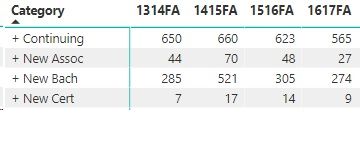
I have the matrix below. Is there a way to get the min/max of each row in the matrix? Each is based on a measure called RegSum. Thanks.
Solved! Go to Solution.
I got it solved by creating a new measure, which I can put in a second matrix.
MaxValue= MAXX ( SUMMARIZE ( Table1, Table1[Category], Table1[YearTerm] , "MaxCol", [RegSum] ), [MaxCol] )
MinValue= MINX ( SUMMARIZE ( Table1, Table1[Category], Table1[YearTerm] , "MinCol", [RegSum] ), [MinCol] )
This link was very helpful:
https://community.powerbi.com/t5/Community-Blog/Design-Pattern-Groups-and-Super-Groups/ba-p/138149
Hi,
Do you want to create 2 additional columns showing the min and max for each row? If yes, i do not think that is possible. What is possible though is to get the min or max for each row in the Grand Total column.
If that works for you, share the link from where i can download your PBI file.
I got it solved by creating a new measure, which I can put in a second matrix.
MaxValue= MAXX ( SUMMARIZE ( Table1, Table1[Category], Table1[YearTerm] , "MaxCol", [RegSum] ), [MaxCol] )
MinValue= MINX ( SUMMARIZE ( Table1, Table1[Category], Table1[YearTerm] , "MinCol", [RegSum] ), [MinCol] )
This link was very helpful:
https://community.powerbi.com/t5/Community-Blog/Design-Pattern-Groups-and-Super-Groups/ba-p/138149
The Power BI Data Visualization World Championships is back! Get ahead of the game and start preparing now!
| User | Count |
|---|---|
| 40 | |
| 37 | |
| 35 | |
| 31 | |
| 28 |
| User | Count |
|---|---|
| 137 | |
| 102 | |
| 71 | |
| 67 | |
| 65 |