This time we’re going bigger than ever. Fabric, Power BI, SQL, AI and more. We're covering it all. You won't want to miss it.
Learn moreDid you hear? There's a new SQL AI Developer certification (DP-800). Start preparing now and be one of the first to get certified. Register now
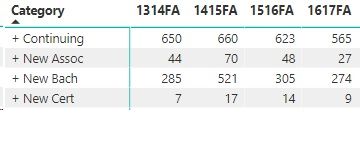
I have the matrix below. Is there a way to get the min/max of each row in the matrix? Each is based on a measure called RegSum. Thanks.
Solved! Go to Solution.
I got it solved by creating a new measure, which I can put in a second matrix.
MaxValue= MAXX ( SUMMARIZE ( Table1, Table1[Category], Table1[YearTerm] , "MaxCol", [RegSum] ), [MaxCol] )
MinValue= MINX ( SUMMARIZE ( Table1, Table1[Category], Table1[YearTerm] , "MinCol", [RegSum] ), [MinCol] )
This link was very helpful:
https://community.powerbi.com/t5/Community-Blog/Design-Pattern-Groups-and-Super-Groups/ba-p/138149
Hi,
Do you want to create 2 additional columns showing the min and max for each row? If yes, i do not think that is possible. What is possible though is to get the min or max for each row in the Grand Total column.
If that works for you, share the link from where i can download your PBI file.
I got it solved by creating a new measure, which I can put in a second matrix.
MaxValue= MAXX ( SUMMARIZE ( Table1, Table1[Category], Table1[YearTerm] , "MaxCol", [RegSum] ), [MaxCol] )
MinValue= MINX ( SUMMARIZE ( Table1, Table1[Category], Table1[YearTerm] , "MinCol", [RegSum] ), [MinCol] )
This link was very helpful:
https://community.powerbi.com/t5/Community-Blog/Design-Pattern-Groups-and-Super-Groups/ba-p/138149
Check out the April 2026 Power BI update to learn about new features.
Sign up to receive a private message when registration opens and key events begin.
If you have recently started exploring Fabric, we'd love to hear how it's going. Your feedback can help with product improvements.
| User | Count |
|---|---|
| 36 | |
| 33 | |
| 31 | |
| 21 | |
| 16 |
| User | Count |
|---|---|
| 66 | |
| 55 | |
| 31 | |
| 24 | |
| 23 |