cancel
Showing results for 
Search instead for 
Did you mean: 

July 7 - July 17 | Round 2 of the Power BI Dataviz World Championships. Don't miss your chance! Learn more

Reply
Anonymous
Not applicable

Metadata impliede size error

Hey!


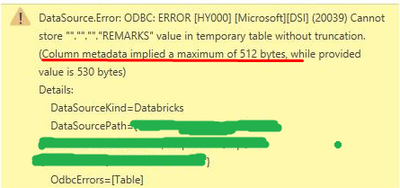
We are pulling data from the Azure Databricks and getting this error

Farol_0-1674246521229.png

As it reads, the problem is with the size of metadata of some columns.

And in the database the columns indeed have quite extensive descriptions/metadata.

How to disable this, so metadata is not being pulled into Power BI?

3 REPLIES 3
Anonymous
Not applicable

In my case, I created another view in the database and dropped all the meta there. And then PoweBI pulled from this view instead of the actual table.

renatofreitas
New Member

Hi everyone.


I have the same error.


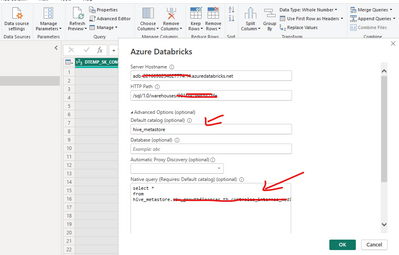
For me the workaround was using a query instead of the default table browser.


renatofreitas_0-1695386710698.png


DeyoSwed
Regular Visitor

Did you solve this?

Helpful resources

Announcements
FabCon and SQLCon Barcelona 2026

FabCon & SQLCon – Barcelona 2026

Join us in Barcelona for FabCon and SQLCon, the Fabric, Power BI, SQL, and AI community event. Save €200 with code FABCMTY200.

Fabric Community Sticker Design Challenge Barcelona Carousel

Fabric Community Sticker Challenge - Barcelona 2026

If you love stickers, then you will definitely want to check out our community sticker challenge, Barcelona edition!

July Power BI Update Carousel

Power BI Monthly Update - July 2026

Check out the July 2026 Power BI update to learn about new features.

Power BI DataViz World Championships carousel

Power BI DataViz World Championships - June 2026

A new Power BI DataViz World Championship is coming this June! Don't miss out on submitting your entry.

Top Solution Authors