cancel
Showing results for 
Search instead for 
Did you mean: 

Get Fabric Certified for FREE during Fabric Data Days. Don't miss your chance! Request now

Reply
Anonymous
Not applicable

Metadata impliede size error

Hey!


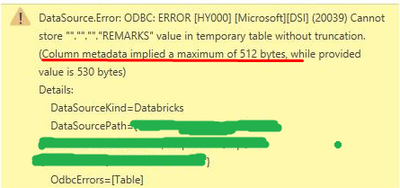
We are pulling data from the Azure Databricks and getting this error

Farol_0-1674246521229.png

As it reads, the problem is with the size of metadata of some columns.

And in the database the columns indeed have quite extensive descriptions/metadata.

How to disable this, so metadata is not being pulled into Power BI?

3 REPLIES 3
Anonymous
Not applicable

In my case, I created another view in the database and dropped all the meta there. And then PoweBI pulled from this view instead of the actual table.

renatofreitas
New Member

Hi everyone.


I have the same error.


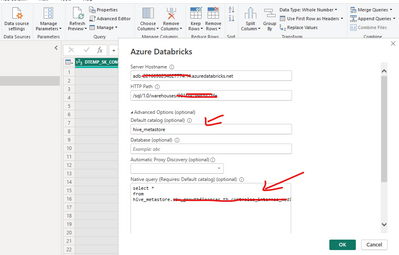
For me the workaround was using a query instead of the default table browser.


renatofreitas_0-1695386710698.png


DeyoSwed
Regular Visitor

Did you solve this?

Helpful resources

Announcements
November Power BI Update Carousel

Power BI Monthly Update - November 2025

Check out the November 2025 Power BI update to learn about new features.

Fabric Data Days Carousel

Fabric Data Days

Advance your Data & AI career with 50 days of live learning, contests, hands-on challenges, study groups & certifications and more!

FabCon Atlanta 2026 carousel

FabCon Atlanta 2026

Join us at FabCon Atlanta, March 16-20, for the ultimate Fabric, Power BI, AI and SQL community-led event. Save $200 with code FABCOMM.

Top Solution Authors
Top Kudoed Authors