This time we’re going bigger than ever. Fabric, Power BI, SQL, AI and more. We're covering it all. You won't want to miss it.
Learn moreDid you hear? There's a new SQL AI Developer certification (DP-800). Start preparing now and be one of the first to get certified. Register now
Hi Experts
is it possible to merger rows of data in a column similiar to excel in power query.....
Before:
Division Location 9 New York 9 London 9 Toronto 10 New York 10 London 10 Florida 10 DC 8 Toronto 8 New York 8 London
After
Division Location 9 New York London Toronto 10 New York London Florida DC 8 Toronto New York London
Solved! Go to Solution.
Hi @Anonymous,
You could have a good look at this video which shows the detail steps.
Best Regards,
Cherry
Hi @Anonymous,
I'm afraid we may not transform your data model to be the same as you expected in Editor Query.
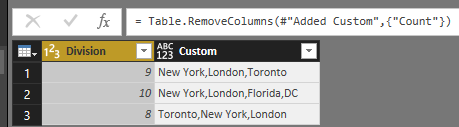
We could merge multiple rows into one row like below.
If you want get this output, you could refer to the expressions below.
#"Grouped Rows" = Table.Group(#"Changed Type", {"Division"}, {{"Count", each _, type table}}),
#"Added Custom" = Table.AddColumn(#"Grouped Rows", "Custom", each Text.Combine([Count][Location],",")),
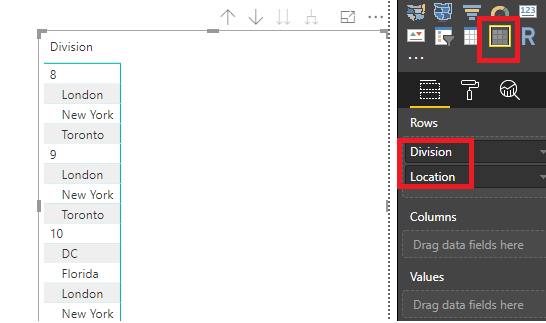
Howeverm, I suggest you could create a matrix to show the data like below which is similar to your desired output.
Best Regards,
Cherry
Thanks for the feebback Cherry
What are the steps to get the above......
Hi @Anonymous,
You could have a good look at this video which shows the detail steps.
Best Regards,
Cherry
Check out the April 2026 Power BI update to learn about new features.
If you have recently started exploring Fabric, we'd love to hear how it's going. Your feedback can help with product improvements.
A new Power BI DataViz World Championship is coming this June! Don't miss out on submitting your entry.
| User | Count |
|---|---|
| 38 | |
| 38 | |
| 31 | |
| 22 | |
| 15 |
| User | Count |
|---|---|
| 74 | |
| 61 | |
| 31 | |
| 31 | |
| 23 |