Get certified for free when you join Fabric Data Days 2026 and dive into Fabric, Power BI, SQL, AI, and other essential data skills.
Join nowData Days is here! Join us now for 60+ days of learning, challenges, and connection. Learn more
Hi,
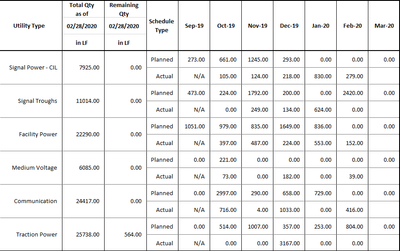
I need to show the following visualization as it is on my report.
Please advise on how I can achieve this visual.
Thanks in advance
Hi @SwaroopShankar ,
Can you show us your .pbix file if it's not confidential,you can upload it to onedrive and share the link with us.
Hi Kelly,
My apologies for the late reply.
What I am trying to achieve is similar to what is on the second page of the following dashboard.
Please take a look at it and let me know how we can achieve this kind of a table?
Thanks in advance
Might be worth looking at what I did with Impossible to see if it might work in this case. I'll take a look later if I have time but PBIX is attached. It is sort of a spin on the disconnected table trick essentially.
I do not think the current Matrix can do this.
I suggested a similar one
https://ideas.powerbi.com/forums/265200-power-bi-ideas/suggestions/39773011-hybrid-table
Don't miss out on Data Days, June 15 through August 7. Learn Fabric, Power BI, SQL, AI and more.
Check out the May 2026 Power BI update to learn about new features.
| User | Count |
|---|---|
| 22 | |
| 21 | |
| 20 | |
| 17 | |
| 13 |
| User | Count |
|---|---|
| 58 | |
| 50 | |
| 37 | |
| 29 | |
| 24 |