Join us at FabCon Atlanta from March 16 - 20, 2026, for the ultimate Fabric, Power BI, AI and SQL community-led event. Save $200 with code FABCOMM.
Register now!Learn from the best! Meet the four finalists headed to the FINALS of the Power BI Dataviz World Championships! Register now
Hi all,
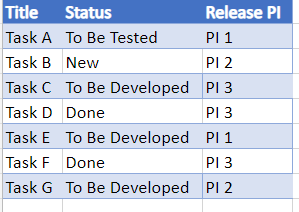
I have this Data set:
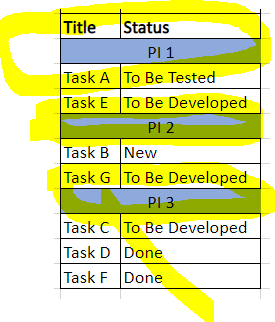
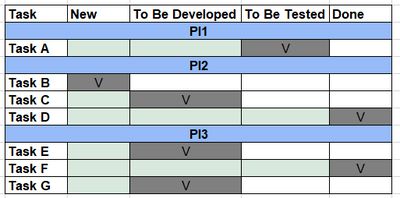
I would like to create the table visualization as below (i.e. the "PI release" column will be order the table and will gather all the Tasks that below to the corrent PI):
What are the chances that it possible in table visualization? if there such as option - how can I create it?
Thanks a lot!
Hi @Anonymous,
Have you tried the Matrix Visual?
Proud to be a Super User!
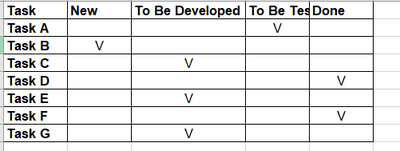
Hi @richbenmintz & thanks for the replaying - Yes, I tried it however I change a little but my data set to this one:
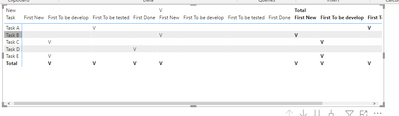
However when I put it in the Matrix table it's duplicate my columns:
The desirable result supposed to be like that:
There is option to do it?
Thanks!
Chen!
Share feedback directly with Fabric product managers, participate in targeted research studies and influence the Fabric roadmap.
Check out the February 2026 Power BI update to learn about new features.
| User | Count |
|---|---|
| 61 | |
| 59 | |
| 42 | |
| 18 | |
| 15 |
| User | Count |
|---|---|
| 108 | |
| 100 | |
| 39 | |
| 29 | |
| 29 |