cancel
Showing results for 
Search instead for 
Did you mean: 

Try your skills in the Power BI Dataviz World Championship! Round one ends June 26. Join now

Reply
Sevhan
Regular Visitor

Merge SAP BW Query (Direct Query ) with Excel

Hello everyone,

i `m trying to merge a SAP BW Query with a Excel File.

I have a few questions. Hope someone can help me.


1) Is it possible to merge a SAP BW Query with Excel files? If yes, is it also possible if the SAP BW Query runs in mode "Direct Query"? 

2) Do I need need the Gataway also in the Power BI Desktop Version? Or is it only necessary for the Cloud Version?


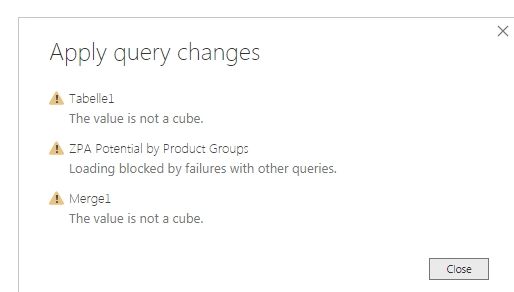
Below are stepts, i have done to merge a SAP BW Query in Direct Query mode with an Excel File. In the last step, trying to close and apply, i get the error message below.


1) Click get Data and selelct an excel file.

2) click on "transofrm data"

3) Add the new Source SAP BW Query (Direct Query)

4) Selectm mode DirectQuery

5 Select Merge Query

6) Do the Merge with Key "Year"

7) Merge is successfull 

😎 Go to Close&Apply

I get following warnings:

Datablending.jpg


Thank you in advance


Sevhan


1 ACCEPTED SOLUTION
mussaenda
Community Champion
Community Champion

Hi @Sevhan ,


first, merging a direct query and a local file will change the query to import mode.

Direct Query restricts many functions in Power Query and some in DAX.


To understand which query you must use that is best fo your needs, I am leaving you this thread.

Thank you

View solution in original post

4 REPLIES 4
mussaenda
Community Champion
Community Champion

Hi @Sevhan ,


first, merging a direct query and a local file will change the query to import mode.

Direct Query restricts many functions in Power Query and some in DAX.


To understand which query you must use that is best fo your needs, I am leaving you this thread.

Thank you

Hi, 

ok, got it. Merging data is only possible for import data.

Is this the reason for the errors i get? 

mussaenda
Community Champion
Community Champion

We can answer that if you will apply it first to your report and see if the error will still occur. 

If yes, then it is not the only reason.


Do not forget to back up your file, just in case.

Hi,

it works. This was the solution.

Thank you!

Helpful resources

Announcements
Fabric Data Days is here Carousel

Fabric Data Days 2026

Don't miss out on Data Days, June 15 through August 7. Learn Fabric, Power BI, SQL, AI and more.

Power BI DataViz World Championships carousel

Power BI DataViz World Championships - June 2026

A new Power BI DataViz World Championship is coming this June! Don't miss out on submitting your entry.