
Don't miss your chance to take the Fabric Data Engineer (DP-600) exam for FREE! Find out how by watching the DP-600 session on-demand now through April 28th.
Learn moreJoin the FabCon + SQLCon recap series. Up next: Power BI, Real-Time Intelligence, IQ and AI, and Data Factory take center stage. All sessions are available on-demand after the live show. Register now
Hello,
I'm wondering if someone can help in what I percieve to be a simple query,
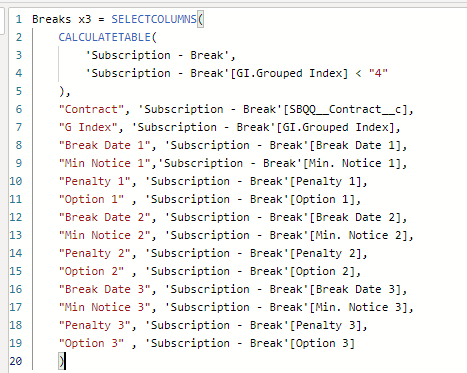
I have a table which I have created in DAX using SELECT COLUMNS and CALCULATETABLE.
The result of thisis the following table:
As you can probably see in this table all rows share the same [Contract] in column 1, I would like this to all appear in one row rather than 3 rows. usually I would do this in power query and unpivot etc. but as this is a calculated table is there a way to do this in DAX?
As always any help or ideas are always appricated.
Dobby Libr3
Solved! Go to Solution.
First GIndex has different values in all three columns.
Second, there should be aggregation function to group function like Min, Max on all other columns
You can also try summarize. example
SUMMARIZE(
data,
data[ID],
"max_date",
MAX( 'Date'[Date]),
"Max_Col", max(data[Col1])
)Appreciate your Kudos. In case, this is the solution you are looking for, mark it as the Solution. In case it does not help, please provide additional information and mark me with @
Thanks. My Recent Blog -
https://community.powerbi.com/t5/Community-Blog/Winner-Topper-on-Map-How-to-Color-States-on-a-Map-wi...
https://community.powerbi.com/t5/Community-Blog/HR-Analytics-Active-Employee-Hire-and-Termination-tr...
https://community.powerbi.com/t5/Community-Blog/Power-BI-Working-with-Non-Standard-Time-Periods/ba-p...
https://community.powerbi.com/t5/Community-Blog/Comparing-Data-Across-Date-Ranges/ba-p/823601
First GIndex has different values in all three columns.
Second, there should be aggregation function to group function like Min, Max on all other columns
You can also try summarize. example
SUMMARIZE(
data,
data[ID],
"max_date",
MAX( 'Date'[Date]),
"Max_Col", max(data[Col1])
)Appreciate your Kudos. In case, this is the solution you are looking for, mark it as the Solution. In case it does not help, please provide additional information and mark me with @
Thanks. My Recent Blog -
https://community.powerbi.com/t5/Community-Blog/Winner-Topper-on-Map-How-to-Color-States-on-a-Map-wi...
https://community.powerbi.com/t5/Community-Blog/HR-Analytics-Active-Employee-Hire-and-Termination-tr...
https://community.powerbi.com/t5/Community-Blog/Power-BI-Working-with-Non-Standard-Time-Periods/ba-p...
https://community.powerbi.com/t5/Community-Blog/Comparing-Data-Across-Date-Ranges/ba-p/823601
Hi @amitchandak ,
Thanks for the response, sorry the about the GIIndex column, it was only there for testing the correct information had pulled through.
SUMMARIZE works perfectly! Thanks for explaining I'll be using this again.
Breaks (Next 3) = SUMMARIZE(
'Subscription - Break',
'Subscription - Break'[SBQQ__Contract__c],
"M Break Date 1", MAX('Subscription - Break'[Break Date 1]),
"M Min Notice 1", MAX('Subscription - Break'[Min. Notice 1]),
"M Penalty 1", MAX('Subscription - Break'[Penalty 1]),
"M Option 1", MAX('Subscription - Break'[Option 1]),
"M Break Date 2", MAX('Subscription - Break'[Break Date 2]),
"M Min Notice 2", MAX('Subscription - Break'[Min. Notice 2]),
"M Penalty 2", MAX('Subscription - Break'[Penalty 2]),
"M Option 2", MAX('Subscription - Break'[Option 2]),
"M Break Date 3", MAX('Subscription - Break'[Break Date 3]),
"M Min Notice 3", MAX('Subscription - Break'[Min. Notice 3]),
"M Penalty 3", MAX('Subscription - Break'[Penalty 3]),
"M Option 3", MAX('Subscription - Break'[Option 3])
Regards
Dobby Libr3
Check out the April 2026 Power BI update to learn about new features.
If you have recently started exploring Fabric, we'd love to hear how it's going. Your feedback can help with product improvements.
A new Power BI DataViz World Championship is coming this June! Don't miss out on submitting your entry.
| User | Count |
|---|---|
| 45 | |
| 38 | |
| 34 | |
| 21 | |
| 17 |
| User | Count |
|---|---|
| 66 | |
| 64 | |
| 31 | |
| 26 | |
| 26 |