Don't miss your chance to take the Fabric Data Engineer (DP-700) exam on us!
Learn moreNext up in the FabCon + SQLCon recap series: The roadmap for Microsoft SQL and Maximizing Developer experiences in Fabric. All sessions are available on-demand after the live show. Register now
Hi,
I am trying to calculate a day by day difference in stock values. To do that I have created a calculated measure called PrevStock:
PrevStock = CALCULATE(SUM('data'[stock]); PREVIOUSDAY('data'[date].[Date]))
Based on that measure I can calculate the difference between stocks in the consecutive days (measure):
Change = sum('data'[stock]) - 'data'[PrevStock]
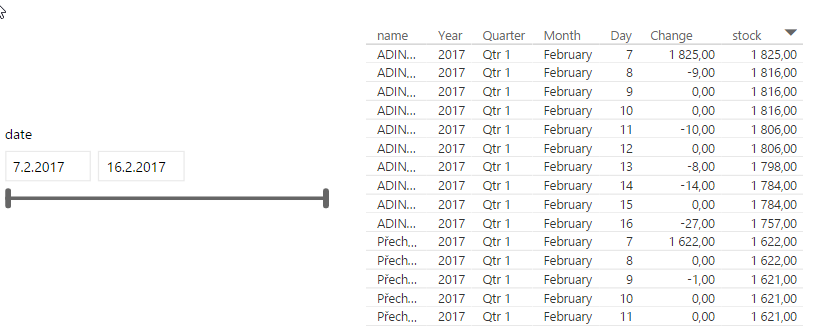
Then I want to display data for a particular month, say February. The problem I am facing is that on 1st Feb "Change" shows a number which is equal to stock amount. I guess when I limit date range it cannot see any previous data so it thinks that "PrevStock" is 0.
I have tried to use IF statement:
Change = IF('data'[PrevStock] = 0; 0; sum('data'[stock]) - 'data'[PrevStock])
But it always runs out of memory. Why is that? How can I solve this? Thanks a lot!
Sample data:
Solved! Go to Solution.
You might consider approaching it in the data model as follows:
* make a duplicate table T2
* in T2 make a calculated column that is (date less 1): PriorDate
Now join your Table to T2 using T1 date field and T2 PriorDate; or possibly even consider a merged table of the two - - kind of thinking out loud here....
* to avoid confusion in field names of T1 and T2 together you might change column name of T2 Stock to PriorStock
via Related method (or possibly the merged table) now you have Stock and Prior Stock in the same record and getting the difference is at your finger tips
You might consider approaching it in the data model as follows:
* make a duplicate table T2
* in T2 make a calculated column that is (date less 1): PriorDate
Now join your Table to T2 using T1 date field and T2 PriorDate; or possibly even consider a merged table of the two - - kind of thinking out loud here....
* to avoid confusion in field names of T1 and T2 together you might change column name of T2 Stock to PriorStock
via Related method (or possibly the merged table) now you have Stock and Prior Stock in the same record and getting the difference is at your finger tips
Dax is not good at row by row comparisons. Take a look at my article here.
http://exceleratorbi.com.au/use-power-query-compare-database-records/
If you have recently started exploring Fabric, we'd love to hear how it's going. Your feedback can help with product improvements.
A new Power BI DataViz World Championship is coming this June! Don't miss out on submitting your entry.
Share feedback directly with Fabric product managers, participate in targeted research studies and influence the Fabric roadmap.
| User | Count |
|---|---|
| 50 | |
| 44 | |
| 41 | |
| 18 | |
| 18 |
| User | Count |
|---|---|
| 69 | |
| 68 | |
| 32 | |
| 32 | |
| 32 |