cancel
Showing results for 
Search instead for 
Did you mean: 

July 7 - July 17 | Round 2 of the Power BI Dataviz World Championships. Don't miss your chance! Learn more

Reply
sanchit
Frequent Visitor

Memory Error : Allocation Faliure.

Hi

I have created a pbix file in 64bit machine. File Size : 22 MB. Rows : 5.5 Million Approx.

Data is fetched from MYSQL Database.

While i try to open the same file in a 32 bit machine, an error message pops up

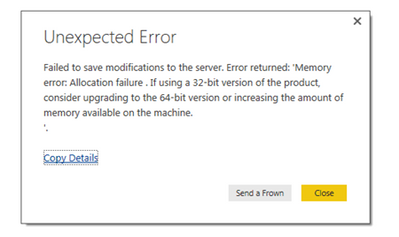
"Failed to save Modification to the server. Error returned : Memory Error : Allocation Faliure. If you are using 32 bit version of the product,consider upgrading to the 64 bit version or increasing the amount of memory available on the machine".


Machine Configuration :

Installed Ram : 3GB.

System Type : 32 Bit

OS : Windows 7

Available RAM : 1.5 GB.


Thank You.

Error.PNG

1 ACCEPTED SOLUTION
v-ljerr-msft
Microsoft Employee
Microsoft Employee

Hi @sanchit,


As suggested in the error message, you may need to increase the amount of memory available on the machine in this scenario(1.5 GB may be not enough for your data mode).


Or you can try to optimize your data model in a way that makes a better use the available memory. For more details, you can refer to this article(though the article is about PowerPivot, it should be similar with Power BI).Smiley Happy


Regards

View solution in original post

7 REPLIES 7
korayem
Frequent Visitor

In my case, I had Windows Page File disabled, limiting PowerBI from allocating extra memory for its usage. Once enabled, the error went away.

Hello there! 

Please help me..


how to enable the windows page file??? Please help...

korayem
Frequent Visitor

In my case, I had Windows Page file disabled and that didnt allow PowerBI to allocate the required memory. Once enabled, the error was gone.

v-ljerr-msft
Microsoft Employee
Microsoft Employee

Hi @sanchit,


As suggested in the error message, you may need to increase the amount of memory available on the machine in this scenario(1.5 GB may be not enough for your data mode).


Or you can try to optimize your data model in a way that makes a better use the available memory. For more details, you can refer to this article(though the article is about PowerPivot, it should be similar with Power BI).Smiley Happy


Regards

Anonymous
Not applicable

I have 174 GB free space in C drive and 3.84 GB usable RAM and using a very small demo data model using access database. Any idea why I am getting this error with simple query changes as DataType and Date Filter.

Anonymous
Not applicable

Its sorted by closing off all other running applications 🙂

Helpful resources

Announcements
FabCon and SQLCon Barcelona 2026

FabCon & SQLCon – Barcelona 2026

Join us in Barcelona for FabCon and SQLCon, the Fabric, Power BI, SQL, and AI community event. Save €200 with code FABCMTY200.

60 days of Data Days Carousel

Data Days 2026

Join Fabric Data Days 2026: 60 days of free live/on-demand sessions, challenges, study groups, and certification opportunities.

Power BI DataViz World Championships carousel

Power BI DataViz World Championships - June 2026

A new Power BI DataViz World Championship is coming this June! Don't miss out on submitting your entry.